Free Shipping on Domestic Orders $75+

HP Pavilion dv2913cl WiFi receiver Replacement

What you need

    1. HP Pavilion dv2913cl WiFi receiver Replacement, WiFi receiver: step 1, image 1 of 1
      • Begin by locating the smallest panel with one screw attaching it to the laptop computer.

      Ask FixBot

      Add Comment

    2. HP Pavilion dv2913cl WiFi receiver Replacement: step 2, image 1 of 1
      • Remove the one screw holding the panel down, and the WiFi receiver will be revealed.

      Ask FixBot

      Add Comment

    3. HP Pavilion dv2913cl WiFi receiver Replacement: step 3, image 1 of 1
      • Remove the two screws that hold down the receiver.

      • Gently slide the chip out of the socket.

      Ask FixBot

      Add Comment

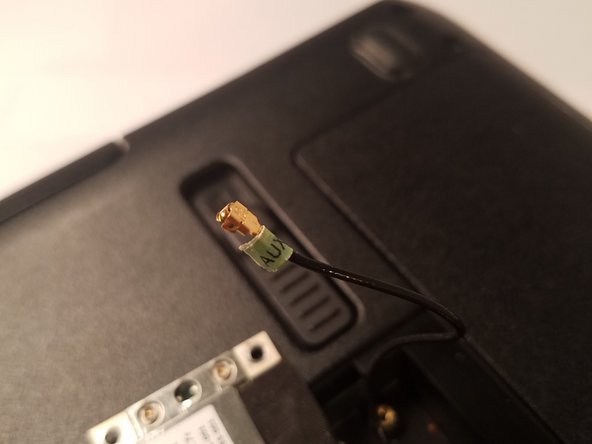
    4. HP Pavilion dv2913cl WiFi receiver Replacement: step 4, image 1 of 2 HP Pavilion dv2913cl WiFi receiver Replacement: step 4, image 2 of 2
      • Remove the two wires labelled AUX and MAIN from the chip.

      • Remember where these were attached previously as it is important for proper functionality after the replacement.

      Ask FixBot

      Add Comment

Conclusion

To reassemble your device, follow these instructions in reverse order.

Cancel: I did not complete this guide.

Adam Braga

Member since: 10/24/16

230 Reputation

2 Guides authored

Team

UMass Dartmouth, Team 2-7, Isaacson Fall 2016 Member of UMass Dartmouth, Team 2-7, Isaacson Fall 2016

UMASSD-ISAACSON-F16S2G7

3 Members

48 Guides authored

0 Guide Comments

Add Comment

View Statistics:

Past 24 Hours: 1

Past 7 Days: 7

Past 30 Days: 26

All Time: 358