Free Shipping on Domestic Orders $75+

HP Pavilion ZD7000 Wi-Fi Card Replacement

What you need

    1. HP Pavilion ZD7000 Wi-Fi Card Replacement, Battery: step 1, image 1 of 1
      • Begin by turning the laptop over so that you can see the bottom of the computer.

      Ask FixBot

      Add Comment

    2. HP Pavilion ZD7000 Wi-Fi Card Replacement: step 2, image 1 of 1
      • Slide the battery release switch to the right while simultaneously lifting up the battery.

      Ask FixBot

      Add Comment

    1. HP Pavilion ZD7000 Wi-Fi Card Replacement, Wi-Fi Card: step 3, image 1 of 2 HP Pavilion ZD7000 Wi-Fi Card Replacement, Wi-Fi Card: step 3, image 2 of 2
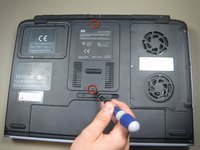
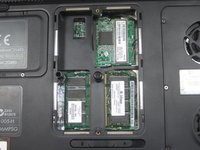
      • Unscrew the 2 screws from the plate that cover the Wi-Fi card.

      • Remove the cover.

      Ask FixBot

      Add Comment

    2. HP Pavilion ZD7000 Wi-Fi Card Replacement: step 4, image 1 of 2 HP Pavilion ZD7000 Wi-Fi Card Replacement: step 4, image 2 of 2
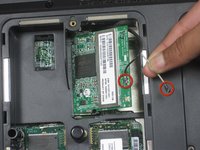
      • Disconnect these 2 antenna wires (which eventually connect to the monitor) from the Wi-Fi card.

      • For reassembly, note where the black and white cables connect to the card.

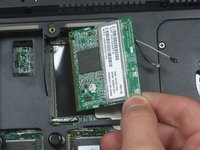
      • Release the Wi-Fi card from the laptop by pressing the metal hinges on either end of it.

      • Gently remove the card from laptop.

      Ask FixBot

      Add Comment

Conclusion

To reassemble your device, follow these instructions in reverse order.

Cancel: I did not complete this guide.

3 other people completed this guide.

Shantel

Member since: 04/20/10

563 Reputation

6 Guides authored

Team

Cal Poly, Team 30-37, Garner Spring 2010 Member of Cal Poly, Team 30-37, Garner Spring 2010

CPSU-GARNER-S10S30G37

4 Members

72 Guides authored

2 Guide Comments

Can you upgrade the wifi card?

danoco - Reply Share

is there a replacement I can buy

Braeden Culp - Reply Share

Add Comment

View Statistics:

Past 24 Hours: 2

Past 7 Days: 5

Past 30 Days: 49

All Time: 5,848