Free Shipping on Domestic Orders $75+

HP Pavilion Wave 600-a014 Mouse and Keyboard Replacement

What you need

    1. HP Pavilion Wave 600-a014 Mouse and Keyboard Replacement, Front IO Board: step 1, image 1 of 2 HP Pavilion Wave 600-a014 Mouse and Keyboard Replacement, Front IO Board: step 1, image 2 of 2
      • Turn over the computer and remove the rubber feet.

      • Remove the 8mm Philips screws indicated in red circles with a Philips #0 screwdriver.

      • Use a pry tool and lift the lid.

      Ask FixBot

      Add Comment

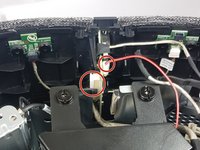
    2. HP Pavilion Wave 600-a014 Mouse and Keyboard Replacement: step 2, image 1 of 2 HP Pavilion Wave 600-a014 Mouse and Keyboard Replacement: step 2, image 2 of 2
      • Pry open the casing from the back of the IO panel, as shown in the pictures.

      Ask FixBot

      Add Comment

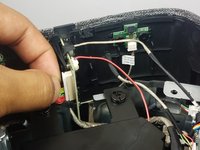
    3. HP Pavilion Wave 600-a014 Mouse and Keyboard Replacement: step 3, image 1 of 2 HP Pavilion Wave 600-a014 Mouse and Keyboard Replacement: step 3, image 2 of 2
      • Finally, remove the two cables circled in red from the front IO panel.

      Ask FixBot

      Add Comment

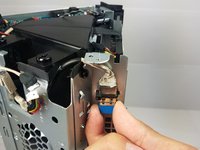
    1. HP Pavilion Wave 600-a014 Mouse and Keyboard Replacement, Mouse and Keyboard adapter: step 4, image 1 of 1
      • Locate a blue USB adapter on the left side of the hard disk compartment.

      Ask FixBot

      Add Comment

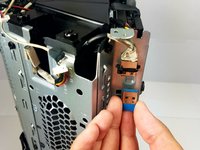
    2. HP Pavilion Wave 600-a014 Mouse and Keyboard Replacement: step 5, image 1 of 2 HP Pavilion Wave 600-a014 Mouse and Keyboard Replacement: step 5, image 2 of 2
      • Take off the USB with gentle but firm pressure.

      • This is a single USB adapter for both mouse and keyboard, so you must get a wireless mouse and keyboard pair, or you will have to use the extra USB for the other one.

      Ask FixBot

      Add Comment

Conclusion

To reassemble your device, follow these instructions in reverse order.

Cancel: I did not complete this guide.

4 other people completed this guide.

Kyaw Soe

Member since: 09/27/17

324 Reputation

2 Guides authored

Team

Cal Poly, Team S8-G4, Banghart Fall 2017 Member of Cal Poly, Team S8-G4, Banghart Fall 2017

CPSU-BANGHART-F17S8G4

4 Members

33 Guides authored

4 Guide Comments

Seems like there might be enough room for a usb 2 port hub/splitter (such as Onvian USB Splitter Cable Male to 2 Female Adapter USB) to add an additional usb dongle (such an RF or Insteon USB)? Can you confirm how much room there are?

thomastranrx - Reply Share

Since it's a year old project, I forgot most of the dimensions, but from my memory, it would be possible since it's located in a little groove that can probably fit a wire or two. (You can see it in step one picture)

Kyaw Soe - Reply Share

Can i purchase this dongle anywhere? Is there any documentation on how to pair?

will - Reply Share

I want to use my keyboard/mouse combo on a different computer. Can I just move the dongle from the Wave to the new computer? Why do I have to remove the red wires?

Thank you!

Laura Ann Smith - Reply Share

Add Comment

View Statistics:

Past 24 Hours: 0

Past 7 Days: 3

Past 30 Days: 17

All Time: 2,837