Free Shipping on Domestic Orders $75+

HP Pavilion Wave 600-a014 Front IO Board Replacement

What you need

    1. HP Pavilion Wave 600-a014 Front IO Board Replacement, Front IO Board: step 1, image 1 of 2 HP Pavilion Wave 600-a014 Front IO Board Replacement, Front IO Board: step 1, image 2 of 2
      • Turn over the computer and remove the rubber feet.

      • Remove the 8mm Philips screws indicated in red circles with a Philips #0 screwdriver.

      • Use a pry tool and lift the lid.

      Ask FixBot

      Add Comment

    2. HP Pavilion Wave 600-a014 Front IO Board Replacement: step 2, image 1 of 2 HP Pavilion Wave 600-a014 Front IO Board Replacement: step 2, image 2 of 2
      • Pry open the casing from the back of the IO panel, as shown in the pictures.

      Ask FixBot

      Add Comment

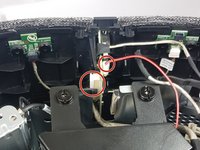
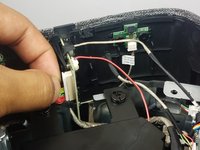
    3. HP Pavilion Wave 600-a014 Front IO Board Replacement: step 3, image 1 of 2 HP Pavilion Wave 600-a014 Front IO Board Replacement: step 3, image 2 of 2
      • Finally, remove the two cables circled in red from the front IO panel.

      Ask FixBot

      Add Comment

Conclusion

To reassemble your device, follow these instructions in reverse order.

Cancel: I did not complete this guide.

Cristian Vanegas

Member since: 09/27/17

321 Reputation

2 Guides authored

Team

Cal Poly, Team S8-G4, Banghart Fall 2017 Member of Cal Poly, Team S8-G4, Banghart Fall 2017

CPSU-BANGHART-F17S8G4

4 Members

33 Guides authored

0 Guide Comments

Add Comment

View Statistics:

Past 24 Hours: 0

Past 7 Days: 1

Past 30 Days: 31

All Time: 1,153