
HP Pavilion Notebook 15-ab293cl CD Drive Replacement

Esdras Teodosio Hernandez and 3 other contributors
Last updated on Dec 28, 2018
Views: 771
View statistics:
- Past 24 Hours:
- 2
- Past 7 Days:
- 14
- Past 30 Days:
- 67
- All Time:
- 771
Comments: 0
No one has left comments on this guide. Will you be first?
Go to guide commentsCompleted: 0 1
No one has marked this guide "completed." Will you be the first?
1 person has marked this guide "completed." It's you — great job!
Favorites: 0 1
No one has favorited (and subscribed to) this guide. Will you be the first?
1 person has favorited (and subscribed to) this guide — and that's you!
Introduction
Go to step 1 ↓Fans are an essential part of a computer. Sometimes fans can blowout due to age or simply faultiness. It is necessary to replace the fan when that occurs.
What you need
Tools


-
-
-
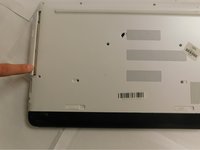
Locate all the screws and remove them with a 3.5 mm screw with a PH0 screw driver.
 Ask FixBot
-
-
-
To pry the CD-Drive off the computer, just use a plastic opening tool. Then pull to remove the CD/DVD drive.
-
-
-



To reassemble your device, follow these instructions in reverse order.

Team

Gateway, Team S1-G2, Luster Fall 2018 Member of Gateway, Team S1-G2, Luster Fall 2018
GCC-LUSTER-F18S1G2
4 Members
48 Guides authored
