
HP Pavilion N3350 Peripheral Component Interconnect (PCI) Replacement

Emily Hatstat and one other contributor
Last updated on May 23, 2018
Views: 466
View statistics:
- Past 24 Hours:
- 2
- Past 7 Days:
- 18
- Past 30 Days:
- 59
- All Time:
- 466
Comments: 0
No one has left comments on this guide. Will you be first?
Go to guide commentsCompleted: 1 2
1 person has marked this guide "completed." Will you be next?
2 people have marked this guide "completed." Including you — great job!
Favorites: 0 1
No one has favorited (and subscribed to) this guide. Will you be the first?
1 person has favorited (and subscribed to) this guide — and that's you!
Introduction
Go to step 1 ↓If you are using a sound card, video card, or network card in your laptop, they are inserted into the PCI slot. If they are malfunctioning, they need to be replaced or cleaned. Once the respective replacement is purchased, follow the guide to replace.
What you need
Tools
-
Spudger4.9

-
-
-
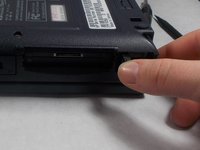
Locate the PCI port, it is next to the CD drive on the right side of the laptop.
 Ask FixBot
-
-
-
-
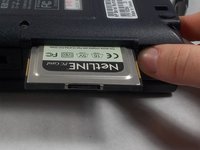
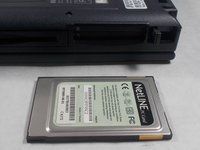
Once popped out, press the button and the inserted PCI should eject and be removed easily.
-
-


To reassemble your device, follow these instructions in reverse order.
Cancel: I did not complete this guide.
One other person completed this guide.

Team

UMass Dartmouth, Team S3-G8, Peak Spring 2018 Member of UMass Dartmouth, Team S3-G8, Peak Spring 2018
UMASSD-PEAK-S18S3G8
3 Members
96 Guides authored
