Introduction
Detaching the battery is the first step before opening up the HP Pavilion G60-120US to fix any problems. This step will eliminate any risks of injury from electrical shock when manipulating the device.
-
-
-
-
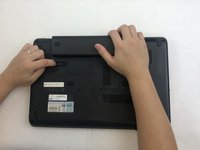
Slide and hold the battery release switch to the left to release the battery from the device.
-
-
-
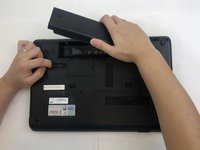
While holding the battery release switch, grab the battery and pull it upward gently.
-

 Ask FixBot


To reassemble your device, follow these instructions in reverse order.
Cancel: I did not complete this guide.
One other person completed this guide.

Team

Embry-Riddle Aeronautical University, Team S20-G6, Branham Fall 2019 Member of Embry-Riddle Aeronautical University, Team S20-G6, Branham Fall 2019
ERAU-BRANHAM-F19S20G6
4 Members
84 Guides authored
