Free Shipping on Domestic Orders $75+

HP Pavilion 17-f004dx RAM Replacement

What you need

    1. HP Pavilion 17-f004dx RAM Replacement, Battery: step 1, image 1 of 1
      • Before you remove the battery, make sure the laptop is powered off.

      • Slide the black battery latches inward to remove the battery.

      Ask FixBot

      Add Comment

    2. HP Pavilion 17-f004dx RAM Replacement: step 2, image 1 of 1
      • Pull the battery out towards you while your fingers are still holding the latches in place.

      Ask FixBot

      Add Comment

    1. HP Pavilion 17-f004dx RAM Replacement, CD Drive: step 3, image 1 of 1
      • Remove one 7 mm screw with a Phillips #1 screwdriver.

      Ask FixBot

      Add Comment

    2. HP Pavilion 17-f004dx RAM Replacement: step 4, image 1 of 3 HP Pavilion 17-f004dx RAM Replacement: step 4, image 2 of 3 HP Pavilion 17-f004dx RAM Replacement: step 4, image 3 of 3
      • Use a metal spudger to push the CD drive out of its slot for removal.

      Ask FixBot

      Add Comment

    1. HP Pavilion 17-f004dx RAM Replacement, Front Panel: step 5, image 1 of 1
      • Remove fifteen 7 mm screws with a Phillips #1 screwdriver.

      Ask FixBot

      Add Comment

    2. HP Pavilion 17-f004dx RAM Replacement: step 6, image 1 of 2 HP Pavilion 17-f004dx RAM Replacement: step 6, image 2 of 2
      • Remove the thin plastic cover using the flat metal spudger to expose another screw.

      • Remove one 7 mm screw with a Phillips #0 screwdriver.

      Ask FixBot

      Add Comment

    3. HP Pavilion 17-f004dx RAM Replacement: step 7, image 1 of 2 HP Pavilion 17-f004dx RAM Replacement: step 7, image 2 of 2
      • Use a metal spudger to remove the rubber "feet" to expose two screws.

      Ask FixBot

      Add Comment

    4. HP Pavilion 17-f004dx RAM Replacement: step 8, image 1 of 1
      • Underneath each rubber foot, there is a screw.

      • Use the Phillips #1 screwdriver to remove a 4.8 mm screw on each side.

      Ask FixBot

      Add Comment

    5. HP Pavilion 17-f004dx RAM Replacement: step 9, image 1 of 1
      • Remove the two black end caps to expose more screws.

      • The end caps will require some force to remove.

      Ask FixBot

      Add Comment

    6. HP Pavilion 17-f004dx RAM Replacement: step 10, image 1 of 1
      • Remove the following six screws with a Phillips #1 screwdriver:

      • Two 7 mm screws.

      • Two 7 mm screws.

      • Two 4.8 mm screws.

      Ask FixBot

      Add Comment

    7. HP Pavilion 17-f004dx RAM Replacement: step 11, image 1 of 1
      • Remove two 2.4 mm broadhead screws from the CD Drive bay with a Phillips #0 screwdriver.

      Ask FixBot

      Add Comment

    8. HP Pavilion 17-f004dx RAM Replacement: step 12, image 1 of 2 HP Pavilion 17-f004dx RAM Replacement: step 12, image 2 of 2
      • Flip the laptop back over. Then, with the laptop open, move the plastic prying tool around the top cover to pry it from the enclosure.

      Ask FixBot

      Add Comment

    9. HP Pavilion 17-f004dx RAM Replacement: step 13, image 1 of 1
      • Partially lift the top cover from the enclosure.

      Ask FixBot

      Add Comment

    10. HP Pavilion 17-f004dx RAM Replacement: step 14, image 1 of 2 HP Pavilion 17-f004dx RAM Replacement: step 14, image 2 of 2
      • Remove the ribbon connecting the power button to the motherboard.

      Ask FixBot

      Add Comment

    11. HP Pavilion 17-f004dx RAM Replacement: step 15, image 1 of 2 HP Pavilion 17-f004dx RAM Replacement: step 15, image 2 of 2
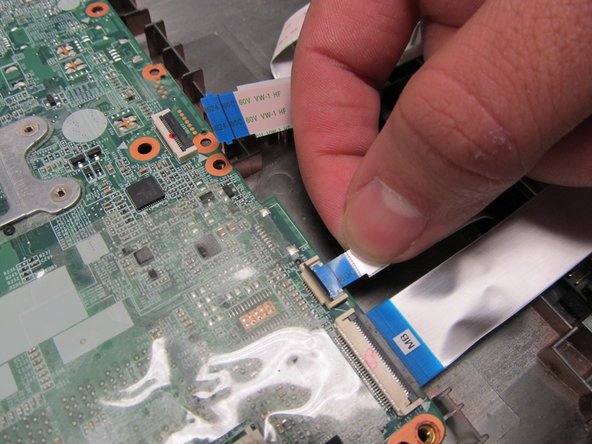
      • Remove the ribbon connecting the mousepad to the motherboard.

      Ask FixBot

      Add Comment

    12. HP Pavilion 17-f004dx RAM Replacement: step 16, image 1 of 2 HP Pavilion 17-f004dx RAM Replacement: step 16, image 2 of 2
      • Remove the ribbon connecting the keyboard to the motherboard.

      • You may now fully lift the front panel from the rest of the laptop.

      Ask FixBot

      Add Comment

    1. HP Pavilion 17-f004dx RAM Replacement, RAM: step 17, image 1 of 1
      • Remove four 5.6 mm screws with a Phillips 1 screwdriver.

      • Remove one 3 mm screw with a Phillips 1 screwdriver.

      Ask FixBot

      Add Comment

    2. HP Pavilion 17-f004dx RAM Replacement: step 18, image 1 of 2 HP Pavilion 17-f004dx RAM Replacement: step 18, image 2 of 2
      • Remove the ribbon connecting the optical drive bay to the motherboard.

      Ask FixBot

      Add Comment

    3. HP Pavilion 17-f004dx RAM Replacement: step 19, image 1 of 2 HP Pavilion 17-f004dx RAM Replacement: step 19, image 2 of 2
      • Remove the ribbon connecting the hard drive to the motherboard.

      Ask FixBot

      Add Comment

    4. HP Pavilion 17-f004dx RAM Replacement: step 20, image 1 of 2 HP Pavilion 17-f004dx RAM Replacement: step 20, image 2 of 2
      • Disconnect the ribbon from the motherboard that passes over the hard drive.

      Ask FixBot

      Add Comment

    5. HP Pavilion 17-f004dx RAM Replacement: step 21, image 1 of 2 HP Pavilion 17-f004dx RAM Replacement: step 21, image 2 of 2
      • There are still cables between the motherboard and the laptop.

      • Carefully lift the motherboard and lean it against the screen.

      Ask FixBot

      Add Comment

    6. HP Pavilion 17-f004dx RAM Replacement: step 22, image 1 of 3 HP Pavilion 17-f004dx RAM Replacement: step 22, image 2 of 3 HP Pavilion 17-f004dx RAM Replacement: step 22, image 3 of 3
      • The motherboard has two slots for the RAM. The process for removing each one is the same

      • Pull the metal tabs away from the RAM.

      Ask FixBot

      Add Comment

    7. HP Pavilion 17-f004dx RAM Replacement: step 23, image 1 of 1
      • Do not touch the circuits on the RAM. Only hold the RAM by its edges.

      • Gently remove the RAM from its slot.

      Ask FixBot

      Add Comment

Conclusion

To reassemble your device, follow these instructions in reverse order.

Cancel: I did not complete this guide.

4 other people completed this guide.

Allan Soria

Member since: 09/21/16

665 Reputation

4 Guides authored

Team

UC Davis, Team 1-4, Oliver Fall 2016 Member of UC Davis, Team 1-4, Oliver Fall 2016

UCD-OLIVER-F16S1G4

4 Members

95 Guides authored

0 Guide Comments

Add Comment

View Statistics:

Past 24 Hours: 1

Past 7 Days: 4

Past 30 Days: 25

All Time: 2,326