
HP Pavilion 17 TS Wireless Card Replacement

Sean Croft and 2 other contributors
Last updated on May 7, 2024
Views: 702
View statistics:
- Past 24 Hours:
- 3
- Past 7 Days:
- 25
- Past 30 Days:
- 92
- All Time:
- 702
Comments: 1
1 comment on steps.
Completed: 1 2
1 person has marked this guide "completed." Will you be next?
2 people have marked this guide "completed." Including you — great job!
Favorites: 0 1
No one has favorited (and subscribed to) this guide. Will you be the first?
1 person has favorited (and subscribed to) this guide — and that's you!
Needs Better Images
Better photos will improve this guide. Help out by taking, editing, or uploading new ones!
Introduction
Go to step 1 ↓The wireless card is what allows you to connect to the internet. It is a small component, but is still very important. This guide will show you how to replace it.
What you need
Tools


-
-
-
Press and hold the release switch, and then slide the battery out. Insert the new battery into the slot and you're done!
 Ask FixBot
-
-
-
-
-
-
In the battery compartment, find the phillips screw that is holding the rear panel onto the computer. Unscrew it.
-
With the battery compartment closest to you, push the panel away from you. Once it slides back until it stops, gently lift it and put it to the side.
-
Please note that this particular screw does not completely come out, it stays with the rear panel and that is ok.
-
-
-
-
Tool used on this step:Tweezers$4.99
-
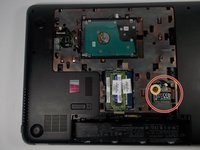
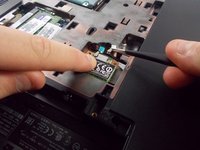
Undo the two clips attached to the wifi chip by pulling up gently with a pair of tweezers.
-
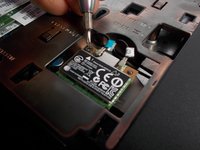
Unscrew the 9mm phillips screw holding the wifi chip in place.
-
Gently remove the wifi chip from its socket and place it to the side.
-
-


To reassemble your device, follow these instructions in reverse order.
Cancel: I did not complete this guide.
One other person completed this guide.

Team

UMass Dartmouth, Team 1-6, Miles Spring 2016 Member of UMass Dartmouth, Team 1-6, Miles Spring 2016
UMASSD-MILES-S16S1G6
3 Members
108 Guides authored
