Free Shipping on Domestic Orders $75+

HP Pavilion 15-n232nr Keyboard Replacement

What you need

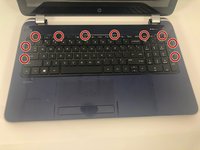
    1. HP Pavilion 15-n232nr Keyboard Replacement, Keyboard: step 1, image 1 of 2 HP Pavilion 15-n232nr Keyboard Replacement, Keyboard: step 1, image 2 of 2
      • Unscrew the 6 mm Phillips #1 screw securing the keyboard.

      Ask FixBot

      Add Comment

    2. HP Pavilion 15-n232nr Keyboard Replacement: step 2, image 1 of 2 HP Pavilion 15-n232nr Keyboard Replacement: step 2, image 2 of 2
      • Flip the laptop to the front side and open it up.

      Ask FixBot

      Add Comment

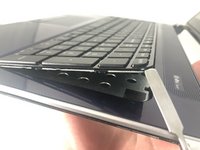
    3. HP Pavilion 15-n232nr Keyboard Replacement: step 3, image 1 of 2 HP Pavilion 15-n232nr Keyboard Replacement: step 3, image 2 of 2
      • Use the metal spudger to release the keyboard from the front panel.

      Ask FixBot

      Add Comment

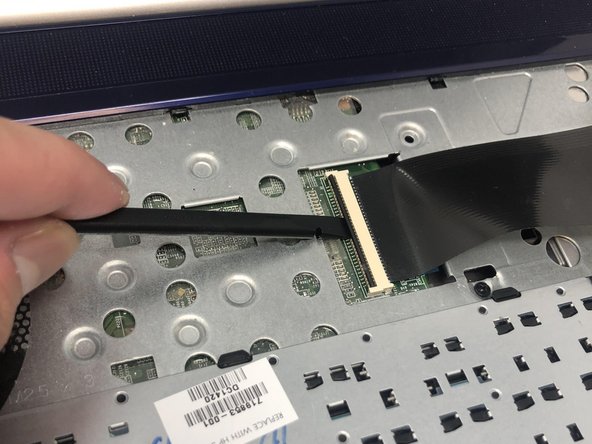
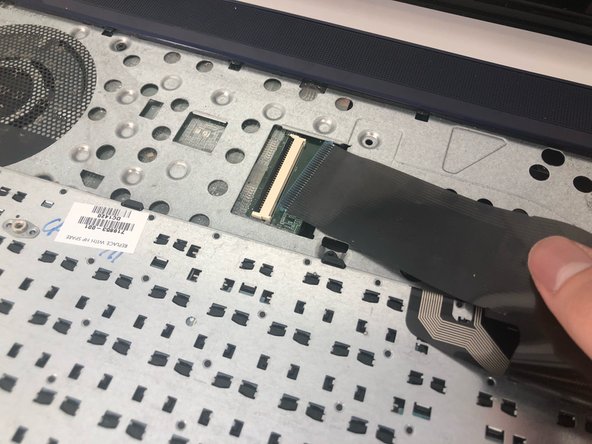
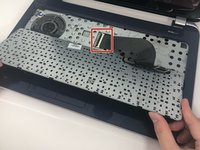
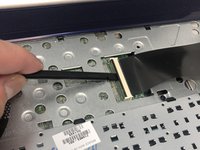
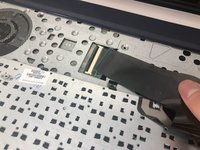
    4. HP Pavilion 15-n232nr Keyboard Replacement: step 4, image 1 of 3 HP Pavilion 15-n232nr Keyboard Replacement: step 4, image 2 of 3 HP Pavilion 15-n232nr Keyboard Replacement: step 4, image 3 of 3
      • Flip the keyboard out and locate the connector.

      • Use the spudger to unhinge the the fastener and remove the connector.

      • Keyboard should be completely detached after this step.

      Ask FixBot

      Add Comment

Conclusion

To reassemble your device, follow these instructions in reverse order.

Cancel: I did not complete this guide.

3 other people completed this guide.

[deleted]

Member since: 03/18/19

289 Reputation

2 Guides authored

0 Guide Comments

Add Comment

View Statistics:

Past 24 Hours: 1

Past 7 Days: 4

Past 30 Days: 26

All Time: 742