Free Shipping on Domestic Orders $75+

HP Pavilion 15-d035dx USB Port Replacement

What you need

    1. HP Pavilion 15-d035dx USB Port Replacement, Battery: step 1, image 1 of 3 HP Pavilion 15-d035dx USB Port Replacement, Battery: step 1, image 2 of 3 HP Pavilion 15-d035dx USB Port Replacement, Battery: step 1, image 3 of 3
      • Switch the first lock, with the padlock icon, to the open position.

      • Then hold the second lock with the battery icon to the open position, while sliding out the battery pack.

      Ask FixBot

      Add Comment

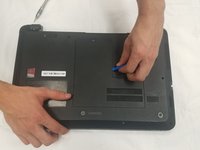
    1. HP Pavilion 15-d035dx USB Port Replacement, Front Panel: step 2, image 1 of 1
      • Begin by laying the laptop on its backside with the bottom of the laptop facing you.

      Ask FixBot

      Add Comment

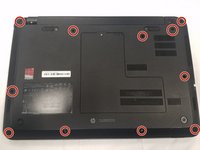
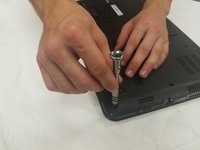
    2. HP Pavilion 15-d035dx USB Port Replacement: step 3, image 1 of 2 HP Pavilion 15-d035dx USB Port Replacement: step 3, image 2 of 2
      • There will be 11, 2.5x3.0mm Philips head screws that you will need to locate.

      • Continue by unscrewing all of them using a 0 Phillips screwdriver.

      Ask FixBot

      Add Comment

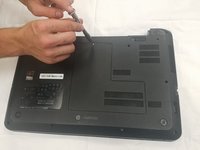
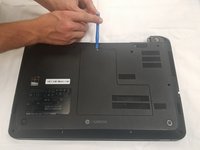
    3. HP Pavilion 15-d035dx USB Port Replacement: step 4, image 1 of 3 HP Pavilion 15-d035dx USB Port Replacement: step 4, image 2 of 3 HP Pavilion 15-d035dx USB Port Replacement: step 4, image 3 of 3
      • Take off the back panel by removing the 4.0x4.7mm Philips head screw.

      • Then using the opening tool, work around the edges to pull off the back panel.

      • It will take some force to get the back panel off.

      Ask FixBot

      Add Comment

    4. HP Pavilion 15-d035dx USB Port Replacement: step 5, image 1 of 1
      • Now flip the computer right side up and open up the laptop.

      • You should be facing the screen and keyboard.

      Ask FixBot

      Add Comment

    5. HP Pavilion 15-d035dx USB Port Replacement: step 6, image 1 of 1
      • Now using the opening tool remove the front panel from the back panel.

      • It should start to pop off, you will have to do this step around the entire computer.

      • It will give some resistance so take your time to ensure that nothing breaks.

      Ask FixBot

      Add Comment

    6. HP Pavilion 15-d035dx USB Port Replacement: step 7, image 1 of 1
      • Once you have popped off the panel it should simply be able to lift off of the laptop.

      • Keep in mind that the keyboard is still connected to the motherboard. Simply lay the keyboard on top of the screen while you are completing future guides.

      • You can replace the front panel now.

      Ask FixBot

      Add Comment

    1. HP Pavilion 15-d035dx USB Port Replacement, USB Port: step 8, image 1 of 1
      • The USB Hub will be on the right side of the HP Pavilion Laptop.

      Ask FixBot

      Add Comment

    2. HP Pavilion 15-d035dx USB Port Replacement: step 9, image 1 of 1
      • There will be two screws (4.0x4.7mm) that need to be removed so lift the Hub away from the computer.

      Ask FixBot

      Add Comment

    3. HP Pavilion 15-d035dx USB Port Replacement: step 10, image 1 of 1
      • Next disconnect the flat cable by pulling the cable straight out of the connector from the USB Hub.

      Ask FixBot

      Add Comment

Conclusion

To reassemble your device, follow these instructions in reverse order.

Cancel: I did not complete this guide.

Stone Morris

Member since: 09/25/17

101 Reputation

1 Guide authored

0 Guide Comments

Add Comment

View Statistics:

Past 24 Hours: 0

Past 7 Days: 4

Past 30 Days: 21

All Time: 1,620