
HP Pavilion 15-d035dx Front Panel Replacement

John Atkins and 3 other contributors
Last updated on Jun 13, 2019
Views: 1.6K
View statistics:
- Past 24 Hours:
- 3
- Past 7 Days:
- 22
- Past 30 Days:
- 111
- All Time:
- 1,568
Comments: 0
No one has left comments on this guide. Will you be first?
Go to guide commentsCompleted: 1 2
1 person has marked this guide "completed." Will you be next?
2 people have marked this guide "completed." Including you — great job!
Favorites: 0 1
No one has favorited (and subscribed to) this guide. Will you be the first?
1 person has favorited (and subscribed to) this guide — and that's you!
Better Introduction
Improve this guide by completing or revising its introduction.
What you need
Tools


-
-
-
Switch the first lock, with the padlock icon, to the open position.
-
Then hold the second lock with the battery icon to the open position, while sliding out the battery pack.
 Ask FixBot
-
-
-
-
-
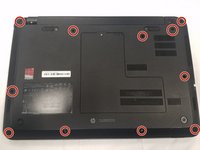
Begin by laying the laptop on its backside with the bottom of the laptop facing you.
-
-
-
There will be 11, 2.5x3.0mm Philips head screws that you will need to locate.
-
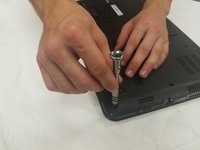
Continue by unscrewing all of them using a 0 Phillips screwdriver.
-
-
-
-
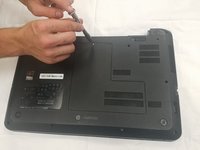
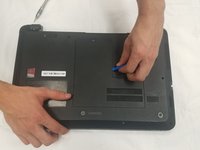
Take off the back panel by removing the 4.0x4.7mm Philips head screw.
-
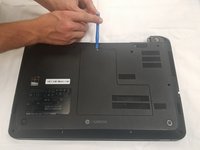
Then using the opening tool, work around the edges to pull off the back panel.
-
-
-
Now flip the computer right side up and open up the laptop.
-
You should be facing the screen and keyboard.
-
-
-
Now using the opening tool remove the front panel from the back panel.
-
It should start to pop off, you will have to do this step around the entire computer.
-
-
-
Once you have popped off the panel it should simply be able to lift off of the laptop.
-
Keep in mind that the keyboard is still connected to the motherboard. Simply lay the keyboard on top of the screen while you are completing future guides.
-
You can replace the front panel now.
-
-






To reassemble your device, follow these instructions in reverse order.
Cancel: I did not complete this guide.
One other person completed this guide.

Team

University of North Texas, Team S1-G2, Thompson Fall 2017 Member of University of North Texas, Team S1-G2, Thompson Fall 2017
UNT-THOMPSON-F17S1G2
4 Members
72 Guides authored
