Introduction
This guide will walk you through removing the SSD from your HP Pavilion 15-cs0012cl. You may need to remove the SSD to upgrade your storage, replace a failing drive, or access other internal components. Before you begin, make sure the laptop is powered off and unplugged. Take precautions against static electricity by grounding yourself, and handle the SSD carefully, especially the connectors, to avoid damaging the device.
What you need
-
-
-
Remove the three 5.6 mm screws from the back of the laptop using a Phillips #0 screwdriver.
-
Remove the two rubber feet at the top of the case.
-
Remove the three 5.6mm hidden screws using a Phillips #0 screwdriver.
-
Insert a plastic pick between the bottom cover and the laptop chassis.
-
Slide the pick along the edges to detach the bottom cover, then lift it off.
 Ask FixBot
-
-
-
-
Remove the two 4.3 mm screws securing the battery using a Phillips #0 screwdriver.
-
Lift the battery up and pull it away from the motherboard to remove it.
-
-
-
-
-
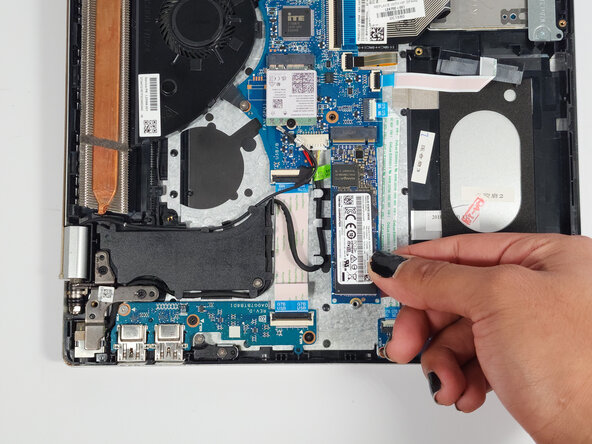
Turn the laptop 90 degrees to the right for the best working angle.
-
Use a Phillips #0 screwdriver to remove the 3.3 mm screw.
-
Pull the SSD straight out of the slot to remove it.
-
-




To reassemble your device, follow these instructions in reverse order.

Team

Austin Community College, Team 2-3, Watkins Spring 2026 Member of Austin Community College, Team 2-3, Watkins Spring 2026
AUSTINCC-WATKINS-S26S2G3
4 Members
60 Guides authored
