Free Shipping on Domestic Orders $75+

HP Pavilion 15-ab165us RAM Replacement

What you need

    1. HP Pavilion 15-ab165us RAM Replacement, Battery and Back Cover: step 1, image 1 of 2 HP Pavilion 15-ab165us RAM Replacement, Battery and Back Cover: step 1, image 2 of 2
      • Flip the computer over so that the bottom cover is facing you.

      • Slide the two locks to the "unlock" position and remove the battery.

      Ask FixBot

      Add Comment

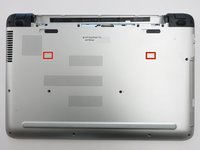
    2. HP Pavilion 15-ab165us RAM Replacement: step 2, image 1 of 3 HP Pavilion 15-ab165us RAM Replacement: step 2, image 2 of 3 HP Pavilion 15-ab165us RAM Replacement: step 2, image 3 of 3
      • Remove the two 8mm screws underneath with a Phillips #1 screwdriver.

      • Use a plastic opening tool to remove the plastic feet.

      Ask FixBot

      Add Comment

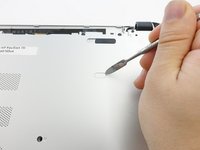
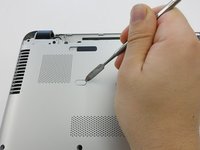
    3. HP Pavilion 15-ab165us RAM Replacement: step 3, image 1 of 3 HP Pavilion 15-ab165us RAM Replacement: step 3, image 2 of 3 HP Pavilion 15-ab165us RAM Replacement: step 3, image 3 of 3
      • Remove the two plastic tabs with a metal spudger.

      Ask FixBot

      Add Comment

    4. HP Pavilion 15-ab165us RAM Replacement: step 4, image 1 of 1
      • Remove the sixteen 8mm screws that hold the bottom cover with a Phillips #1 screwdriver.

      Ask FixBot

      Add Comment

    5. HP Pavilion 15-ab165us RAM Replacement: step 5, image 1 of 1
      • Pull the Optical Drive out.

      Ask FixBot

      Add Comment

    6. HP Pavilion 15-ab165us RAM Replacement: step 6, image 1 of 1
      • Remove the 3mm screws that were hidden under the Optical Drive with a Phillips #0 screwdriver.

      Ask FixBot

      Add Comment

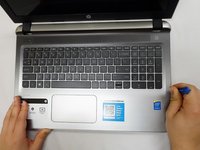
    7. HP Pavilion 15-ab165us RAM Replacement: step 7, image 1 of 2 HP Pavilion 15-ab165us RAM Replacement: step 7, image 2 of 2
      • Flip the computer back over.

      • Use a plastic opening tool to release the clips holding the keyboard section in place.

      Ask FixBot

      Add Comment

    8. HP Pavilion 15-ab165us RAM Replacement: step 8, image 1 of 1
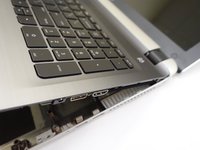
      • Close the lid and pull the screen and keyboard section up and away from the disconnected bottom cover.

      • The hard drive is NOT screwed into place on the underside of the keyboard section.

      Ask FixBot

      Add Comment

    1. HP Pavilion 15-ab165us RAM Replacement, RAM: step 9, image 1 of 1
      • Locate RAM.

      Ask FixBot

      Add Comment

    2. HP Pavilion 15-ab165us RAM Replacement: step 10, image 1 of 1
      • Pull the tension arms away from both sides the RAM.

      Ask FixBot

      Add Comment

    3. HP Pavilion 15-ab165us RAM Replacement: step 11, image 1 of 1
      • Pull RAM away from the RAM slot.

      Ask FixBot

      Add Comment

    4. HP Pavilion 15-ab165us RAM Replacement: step 12, image 1 of 1
      • Repeat this process for the next stick of RAM.

      Ask FixBot

      Add Comment

Conclusion

To reassemble your device, follow these instructions in reverse order.

Cancel: I did not complete this guide.

3 other people completed this guide.

Myai Nguyen

Member since: 10/20/17

206 Reputation

1 Guide authored

Team

UW Tacoma, Team S1-G2, Rose Fall 2017 Member of UW Tacoma, Team S1-G2, Rose Fall 2017

UWT-ROSE-F17S1G2

5 Members

72 Guides authored

0 Guide Comments

Add Comment

View Statistics:

Past 24 Hours: 1

Past 7 Days: 3

Past 30 Days: 23

All Time: 2,672