
HP Pavilion 14-cf0014dx RAM Replacement

Sam Cole and 2 other contributors
Last updated on Jan 3, 2022
Views: 749
View statistics:
- Past 24 Hours:
- 0
- Past 7 Days:
- 14
- Past 30 Days:
- 66
- All Time:
- 749
Comments: 0
No one has left comments on this guide. Will you be first?
Go to guide commentsCompleted: 0 1
No one has marked this guide "completed." Will you be the first?
1 person has marked this guide "completed." It's you — great job!
Favorites: 0 1
No one has favorited (and subscribed to) this guide. Will you be the first?
1 person has favorited (and subscribed to) this guide — and that's you!
Action Shots
Be an action hero! This guide needs images that better demonstrate how to perform specific actions.
Needs Better Images
Better photos will improve this guide. Help out by taking, editing, or uploading new ones!
Markup Mishap
This guide needs better markups. Help out by correcting or making some markup annotations.
Better Introduction
Improve this guide by completing or revising its introduction.
Introduction
Go to step 1 ↓Is your device not properly loading pages or is experiencing the blue screen of death (BSoD)? If so, the RAM may be faulty and needs to be replaced. Follow the instructions in this guide to remove and replace the RAM in the HP Pavilion 14-cf001dx laptop.
What you need
Tools
-
Spudger4.9


-
-
-
Flip the device over so that the backside is facing you.
-
Remove the rubber feet to expose six screws.
-
Using the Phillips #1 screwdriver, remove six screws securing the back panel to the device.
 Ask FixBot
-
-
-
Insert a plastic opening tool and run it along the edges of the laptop.
-
Remove the back panel from the device.
-
-
-
-
-
-
Using the Phillips #0 screwdriver, remove the four screws securing the battery in place.
-
-
-
-
-
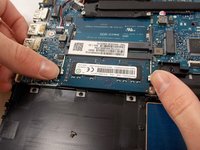
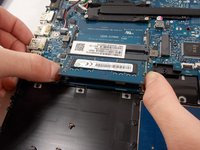
Using your fingers, simultaneously press the two silver clamps away from each other to release the RAM.
-
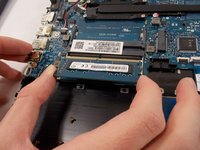
Remove the RAM from the device.
-
-


To reassemble your device, follow these instructions in reverse order.

Team

UMass Dartmouth, Team 2-7, Sinclaire Fall 2021 Member of UMass Dartmouth, Team 2-7, Sinclaire Fall 2021
UMASSD-SINCLAIRE-F21S2G7
3 Members
84 Guides authored
