Free Shipping on Domestic Orders $75+

HP Pavilion 11 x360 Fan Replacement

What you need

    1. HP Pavilion 11 x360 Fan Replacement, Remove Screws: step 1, image 1 of 2 HP Pavilion 11 x360 Fan Replacement, Remove Screws: step 1, image 2 of 2
      • Use the spudger to pry off the two rubber feet near the hinge of the laptop. This will reveal two hidden 9mm screws.

      • You must remove eleven screws.

      • Four 9mm screws with the PH0 screwdriver.

      • Seven 6mm screws with the PH0 screwdriver.

      Ask FixBot

      Add Comment

    2. HP Pavilion 11 x360 Fan Replacement, Remove Backing: step 2, image 1 of 3 HP Pavilion 11 x360 Fan Replacement, Remove Backing: step 2, image 2 of 3 HP Pavilion 11 x360 Fan Replacement, Remove Backing: step 2, image 3 of 3
      • Use the spudger to pry the corners of the laptop near the display hinges.

      • Pry around the seam of the laptop with the plastic opening tool until the backing begins to pull apart.

      • When you lift the bottom cover, there is a cable connected between the motherboard and the bottom cover. Be careful not to pull the cable loose!

      Ask FixBot

      Add Comment

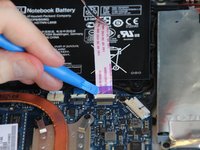
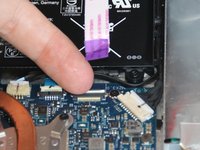
    3. HP Pavilion 11 x360 Fan Replacement, Detach Cable: step 3, image 1 of 2 HP Pavilion 11 x360 Fan Replacement, Detach Cable: step 3, image 2 of 2
      • Use the plastic opening tool to lift the white tab up at the connection.

      • Pull the cable outwards.

      Ask FixBot

      Add Comment

    1. HP Pavilion 11 x360 Fan Replacement, Remove Screws: step 4, image 1 of 1
      • Remove the two 3mm screws with the PH0 screwdriver.

      Ask FixBot

      Add Comment

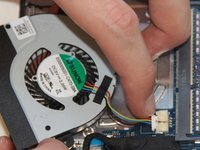
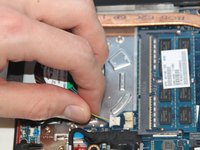
    2. HP Pavilion 11 x360 Fan Replacement, Disconnect Cable: step 5, image 1 of 2 HP Pavilion 11 x360 Fan Replacement, Disconnect Cable: step 5, image 2 of 2
      • Use your fingernails to slowly loosen the fan connection cable.

      • After the cable is slightly pulled from the connection, grab the cable and pull it outwards.

      Ask FixBot

      Add Comment

Conclusion

To reassemble your device, follow these instructions in reverse order.

Cancel: I did not complete this guide.

6 other people completed this guide.

Natalie

Member since: 01/22/15

943 Reputation

4 Guides authored

Team

Cal Poly, Team 19-9, Maness Winter 2015 Member of Cal Poly, Team 19-9, Maness Winter 2015

CPSU-MANESS-W15S19G9

4 Members

72 Guides authored

0 Guide Comments

Add Comment

View Statistics:

Past 24 Hours: 2

Past 7 Days: 10

Past 30 Days: 52

All Time: 3,490