
HP Officejet Pro 6835 Sensor Chip Replacement

Dimitri Charitou and 2 other contributors
Last updated on Mar 26, 2018
Views: 1.7K
View statistics:
- Past 24 Hours:
- 2
- Past 7 Days:
- 20
- Past 30 Days:
- 95
- All Time:
- 1,707
Comments: 3
3 comments on steps.
Completed: 1 2
1 person has marked this guide "completed." Will you be next?
2 people have marked this guide "completed." Including you — great job!
Favorites: 0 1
No one has favorited (and subscribed to) this guide. Will you be the first?
1 person has favorited (and subscribed to) this guide — and that's you!
Introduction
Go to step 1 ↓The sensor chip is a small, green chip located in the top-right corner inside printer. It is held in by a small screw.
What you need
Tools


-
-
-
Open the main lid as far as it will go.
-
Use a plastic opening tool to gently pry off the hinge on the right side by pushing it to the left and off the hook.
-
Open the lid further.
 Ask FixBot
-
-
-
Use a T9 torx screwdriver to remove a total of ten (10) 12mm screws from the main cover by turning the screwdriver counterclockwise.
-
-
-
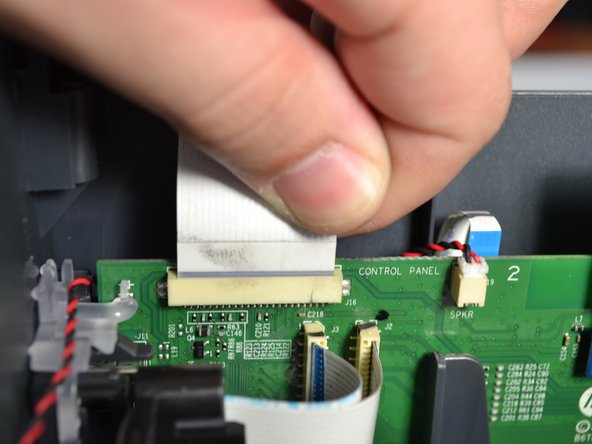
Grab the base of the white ribbon cable connecting the cover to the base of the printer and pull it out.
-
-
-
-
-
-
Twist the screwdriver counter-clockwise to remove the T9 screw on the sensor chip.
-
-
-
Pick up the sensor chip by the edges.
-
Pull the white cable to disconnect it from the sensor chip.
-
Repeat the process with the cable on the bottom.
-
-




To reassemble your device, follow these instructions in reverse order.
Cancel: I did not complete this guide.
One other person completed this guide.

Team

Cal Poly, Team S2-G4, Livingston Winter 2018 Member of Cal Poly, Team S2-G4, Livingston Winter 2018
CPSU-LIVINGSTON-W18S2G4
4 Members
96 Guides authored
