
HP Mini 311 Hard Drive Replacement

Christian Santoyo and 4 other contributors
Last updated on Jan 28, 2014
Views: 5.1K
View statistics:
- Past 24 Hours:
- 2
- Past 7 Days:
- 20
- Past 30 Days:
- 106
- All Time:
- 5,125
Comments: 1
1 guide comment.
Go to guide commentsCompleted: 4 5
4 people have marked this guide "completed." Will you be next?
5 people have marked this guide "completed." Including you — great job!
Favorites: 0 1
No one has favorited (and subscribed to) this guide. Will you be the first?
1 person has favorited (and subscribed to) this guide — and that's you!
Featured Guide
This guide has been found to be exceptionally cool by the iFixit staff.
Introduction
Go to step 1 ↓If your HP Mini 311 has ran out of memory or you desire to have more memory, change the hard drive on your device.
What you need
Tools

-
-
-
Lay the laptop on a flat surface, bottom side up and slide the two battery release latches toward the outside of the case.
 Ask FixBot
-
-
-
-
-
With the device still in a bottom side up position, proceed to unscrew the two 4.8mm Phillips 00 screws from the memory shield.
-
-
-
-
-
-
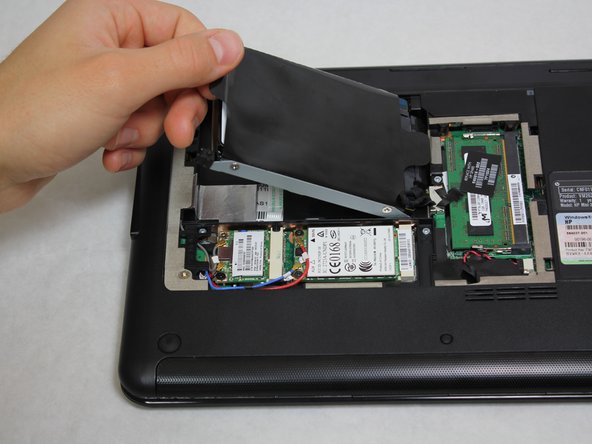
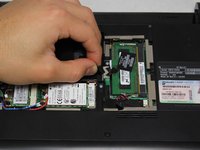
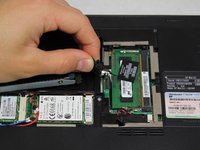
Grab a hold of the wire connecting the hard drive and the device.
-
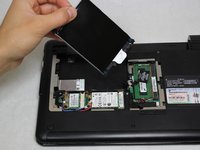
Pull upward, perpendicular to the surface of the laptop, releasing the connector tethering the hard drive to the motherboard.
-





To reassemble your device, follow these instructions in reverse order.
Cancel: I did not complete this guide.
4 other people completed this guide.

Team

Cal Poly, Team 20-4, Maness Winter 2013 Member of Cal Poly, Team 20-4, Maness Winter 2013
CPSU-MANESS-W13S20G4
4 Members
72 Guides authored
