Free Shipping on Domestic Orders $75+

HP Mini 210-1035la Keyboard Replacement

What you need

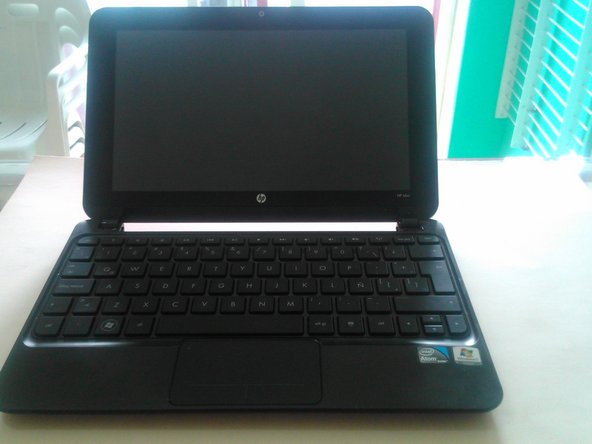
    1. HP Mini 210-1035la Keyboard Replacement, Keyboard: step 1, image 1 of 2 HP Mini 210-1035la Keyboard Replacement, Keyboard: step 1, image 2 of 2
      • Shut down the computer

      • Flip the computer upside down

      • Remove the battery by sliding its tabs in and pulling it away from the laptop.

      Ask FixBot

      Add Comment

    2. HP Mini 210-1035la Keyboard Replacement, Rubber feet: step 2, image 1 of 1
      • Remove the 4 rubber feet

      Ask FixBot

      Add Comment

    3. HP Mini 210-1035la Keyboard Replacement, Removing service cover: step 3, image 1 of 1
      • Simultaneously press in on the right release button (1) to release the right side ofrece the service cover (2)

      • Simultaneously press in on the left release button (3) to release the left side of the service cover (4)

      • Reverse this procedure to insert the service cover

      Ask FixBot

      Add Comment

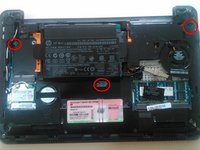
    4. HP Mini 210-1035la Keyboard Replacement, Keyboard's screws: step 4, image 1 of 2 HP Mini 210-1035la Keyboard Replacement, Keyboard's screws: step 4, image 2 of 2
      • Remove the three screws (circled in red) that hold the keyboard

      • With the computer facing you, turn it right-side up.

      • Completely open the computer

      Ask FixBot

      Add Comment

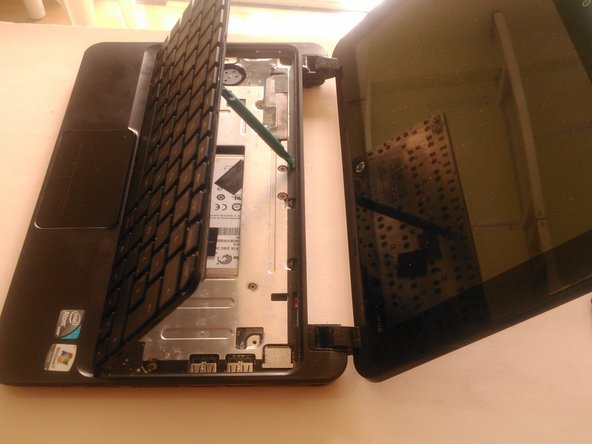
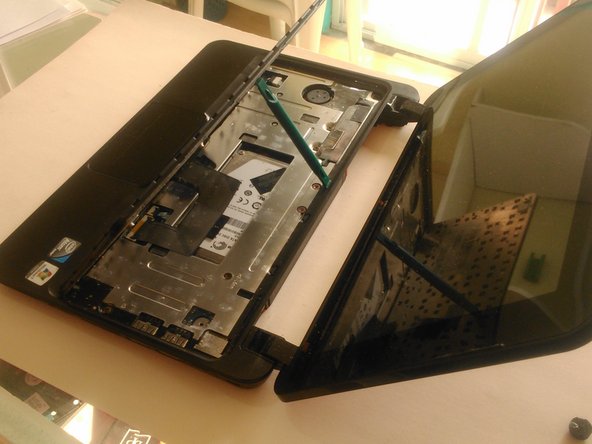
    5. HP Mini 210-1035la Keyboard Replacement, Remove keyboard: step 5, image 1 of 3 HP Mini 210-1035la Keyboard Replacement, Remove keyboard: step 5, image 2 of 3 HP Mini 210-1035la Keyboard Replacement, Remove keyboard: step 5, image 3 of 3
      • Lift the back edge of the key board until it rest at an angle

      • Slide the keyboard back until the keyboard cable and connector are accessible

      • Release the connector to which the keyboard cable has been attaching, and then disconnect the keyboard cable

      • Remove the keyboard

      Ask FixBot

      Add Comment

Conclusion

To reassemble your device, follow these instructions in reverse order.

Cancel: I did not complete this guide.

3 other people completed this guide.

Internet Libre

Member since: 01/15/15

740 Reputation

5 Guides authored

0 Guide Comments

Add Comment

View Statistics:

Past 24 Hours: 0

Past 7 Days: 0

Past 30 Days: 34

All Time: 1,701