
HP Mini 210 Hard Drive Replacement

Heather Freed and 10 other contributors
Last updated on May 7, 2024
Views: 20K
View statistics:
- Past 24 Hours:
- 5
- Past 7 Days:
- 23
- Past 30 Days:
- 122
- All Time:
- 19,503
Comments: 1
1 guide comment.
Go to guide commentsCompleted: 14 15
14 people have marked this guide "completed." Will you be next?
15 people have marked this guide "completed." Including you — great job!
Favorites: 6 7
6 people have favorited (and subscribed to) this guide. Will you be next?
7 people have favorited (and subscribed to) this guide — including you!
Missing Steps
Oops! This guide is currently missing one or more important steps.
Introduction
Go to step 1 ↓If the hard drive makes scratching or whining noises, or if the operating system does not boot due to a disk read error, you may need to replace it.
The hard drive contains operating system files and your personal files. If you intend to replace the hard drive, save any personal files you need later onto an alternative media source before completing these steps. You will need to install an operating system on the new hard drive once the new hard drive is installed on the netbook.
What you need
Tools
-
Spudger4.9
-


-
-
-
Hold the netbook top-side down with the lid closed.
-
Slide the plastic battery release latches towards the lock symbols.
 Ask FixBot
-
-
-
-
-
Turn the netbook to view its edge.
-
Press both orange eject buttons simultaneously, and use a spudger to pry off the back case.
-
-
-
-
Tool used on this step:Tweezers$4.99
-
Peel back the black sticker covering the hard drive with tweezers or your fingers.
-
-
-
-
Use a plastic opening tool to carefully disconnect the hard drive connector found above the RAM slot.
-
-
-
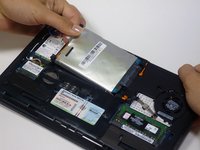
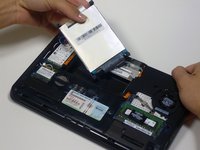
Pull the silver plastic tab up and remove the hard drive. The tab may also be black.
-
-


To reassemble your device, follow these instructions in reverse order.
Cancel: I did not complete this guide.
14 other people completed this guide.

Team

Cal Poly, Team 9-17, Amido Fall 2012 Member of Cal Poly, Team 9-17, Amido Fall 2012
CPSU-AMIDO-F12S9G17
3 Members
96 Guides authored
