
HP Mini 110-3131dx Hard Drive Replacement

aarondcollege and 4 other contributors
Last updated on Dec 17, 2021
Views: 2.2K
View statistics:
- Past 24 Hours:
- 3
- Past 7 Days:
- 36
- Past 30 Days:
- 109
- All Time:
- 2,215
Comments: 0
No one has left comments on this guide. Will you be first?
Go to guide commentsCompleted: 3 4
3 people have marked this guide "completed." Will you be next?
4 people have marked this guide "completed." Including you — great job!
Favorites: 1 2
1 person has favorited (and subscribed to) this guide. Will you be next?
2 people have favorited (and subscribed to) this guide — including you!
Needs More Images
A few more images would make this guide's procedures crystal clear.
Better Introduction
Improve this guide by completing or revising its introduction.
What you need
Tools

-
-
-
Power off the laptop before trying to remove the battery.
-
Turn the laptop upside down, and locate the sliding tabs on the battery.
-
Slide both tabs in an inward direction, then slide the battery away from the laptop.
 Ask FixBot
-
-
-
-
-
To remove the bottom cover pull the orange tab to the right until it clicks.
-
Carefully disconnect the clips as you lift the bottom cover.
-
-
-
-
-
Remove the four screws holding down the hard drive using a Phillips #1 screwdriver.
-
-
-
-
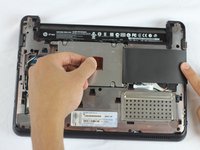
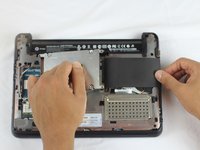
Lift the black flap covering the hard drive then slide it towards the left using the orange tab until it's released from its receptacle.
-
Pull the hard drive out of the laptop.
-
-


To reinstall a new or old hard drive, follow these instructions in reverse order.
Cancel: I did not complete this guide.
3 other people completed this guide.

Team

USF Tampa, Team 2-4, Cagle Fall 2016 Member of USF Tampa, Team 2-4, Cagle Fall 2016
USFT-CAGLE-F16S2G4
5 Members
120 Guides authored
