Introduction
Replacing memory can greatly increase the operating speed of your HP mini.
What you need
-
-
-
Power-off the netbook fully before attempting to remove the battery.
-
Flip your netbook upside down, and locate the sliding tabs near the battery.
-
Slide both tabs inward so that the battery visibly moves away from the case of the computer.
-
Release the tabs and pull the battery out.
 Ask FixBot
-
-
-
-
-
-
Flip the netbook over so you are looking at the bottom, and locate the two screws that hold the memory card cover.
-
Next, take a Phillips PH1 screwdriver and unscrew the two screws.
-
If necessary, use the flat end of the spudger to assist in prying the cover away from the computer.
-
-
-
-
-
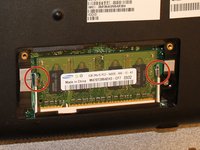
Carefully push the clips to the side, away from the memory card.
-
Note: The memory module is spring-loaded and will pop out when the clips are detatched.
-
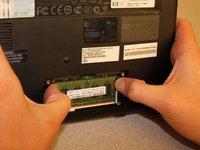
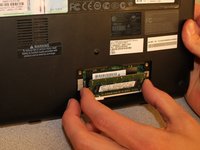
Slide the memory card straight out, holding it as shown to avoid getting skin oils on the electrical contacts.
-
-


To reassemble your device, follow these instructions in reverse order.
Cancel: I did not complete this guide.
2 other people completed this guide.

Team

Clemson, Team 14-1, Benson Fall 2013 Member of Clemson, Team 14-1, Benson Fall 2013
CLEM-BENSON-F13S14G1
3 Members
144 Guides authored
