
HP Mini 1000 RAM Replacement

Walter Galan and 4 other contributors
Last updated on Mar 6, 2018
Views: 5.1K
View statistics:
- Past 24 Hours:
- 3
- Past 7 Days:
- 20
- Past 30 Days:
- 113
- All Time:
- 5,149
Comments: 1
1 comment on steps.
Completed: 2 3
2 people have marked this guide "completed." Will you be next?
3 people have marked this guide "completed." Including you — great job!
Favorites: 4 5
4 people have favorited (and subscribed to) this guide. Will you be next?
5 people have favorited (and subscribed to) this guide — including you!
Introduction
Go to step 1 ↓Use this guide to replace or upgrade the single PC2-4200 RAM stick on your Mini 1000.
What you need

-
-
-
With the case closed, place the Mini 1000 top-side down on a flat surface.
-
Push both of the battery release latches toward each other.
 Ask FixBot
-
-
-
Lift the battery out of the Mini 1000 from the edge closest to the release latches.
-
-
-
-
-
Before proceeding, slide the right battery release latch to the unlocked position nearest the center of the computer.
-
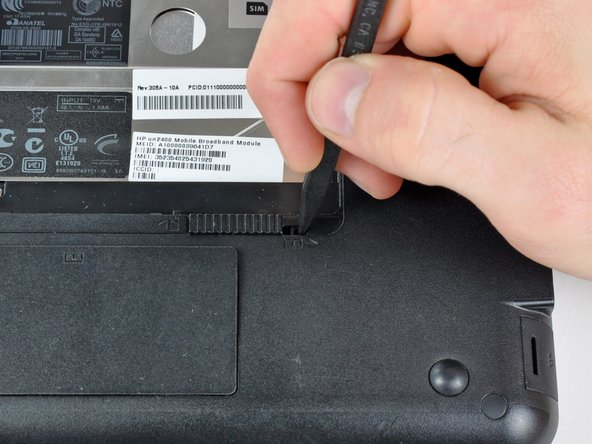
Use the tip of a spudger to slide the RAM compartment cover release latch away from the center of the computer.
-
-
-
-
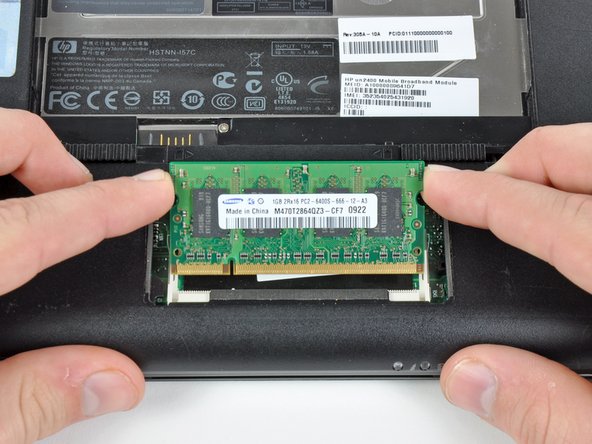
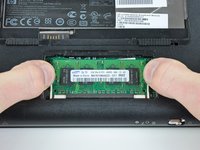
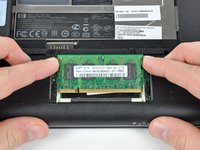
Use your fingers to simultaneously pull both RAM retaining arms away from the center of the RAM chip.
-
Pull the RAM chip out of its socket and remove it from the Mini 1000.
-
-




To reassemble your device, follow these instructions in reverse order.
Cancel: I did not complete this guide.
2 other people completed this guide.

