Introduction
In this repair guide, you will be learning how to re-seat or replace the memory modules in your HP Envy m6-1105dx. For this repair, the only tool you will need is a screwdriver. You will loosen a screw and remove a piece of the plastic casing in order to access the memory module. Don't worry when you can't take out the screw, it doesn't actually come out. To remove the module, simply apply pressure to the levers holding the memory module in place and lift it out.
-
-
-
Turn the computer completely off.
-
Disconnect any devices you have on it.
-
Turn the computer upside down on a flat surface.
 Ask FixBot
-
-
-
Push the battery release latch with one hand.
-
Grab the battery with the other hand.
-
Lift out on an angle.
-
-
-
-
-
-
Release the screw in the center of the service cover.
-
Slide the battery release latch and pull cover towards you.
-
Lift cover off.
-
-
-
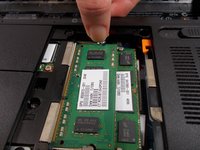
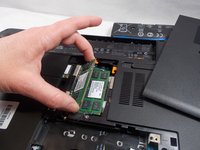
Push the silver levers on either side of the memory module away from the module.
-
Remove the memory module by gently pulling it on an angle away from the slot.
-
-


To reassemble your device, follow these instructions in reverse order.

Team

UMass Dartmouth, Team S1-G5, Valliere Fall 2018 Member of UMass Dartmouth, Team S1-G5, Valliere Fall 2018
UMASSD-VALLIERE-F18S1G5
5 Members
48 Guides authored
