Free Shipping on Domestic Orders $75+

HP Envy 17-J013CL Fan Module Replacement

What you need

  1. HP Envy 17-J013CL Fan Module Replacement, Taking the battery out: step 1, image 1 of 1
    • Hold the laptop and push the slider all the way till the battery pops out a little.

    Ask FixBot

    Add Comment

  2. HP Envy 17-J013CL Fan Module Replacement: step 2, image 1 of 2 HP Envy 17-J013CL Fan Module Replacement: step 2, image 2 of 2
    • Unscrew the screw holding the backplate then pry open the backing.

    Ask FixBot

    Add Comment

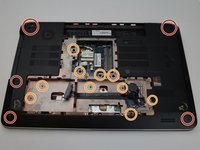
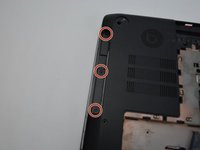
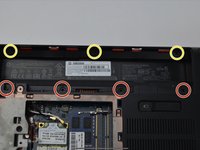
  3. HP Envy 17-J013CL Fan Module Replacement: step 3, image 1 of 3 HP Envy 17-J013CL Fan Module Replacement: step 3, image 2 of 3 HP Envy 17-J013CL Fan Module Replacement: step 3, image 3 of 3
    • Unscrew the screws holding the chassis in place.

    Ask FixBot

    Add Comment

  4. HP Envy 17-J013CL Fan Module Replacement: step 4, image 1 of 1
    • Unscrew the Cd-Player and carefully slide the player out to the side.

    Ask FixBot

    Add Comment

  5. HP Envy 17-J013CL Fan Module Replacement: step 5, image 1 of 1
    • Lift the back plate off the laptop, make sure to remove any wires connected to it.

    Ask FixBot

    Add Comment

  6. HP Envy 17-J013CL Fan Module Replacement: step 6, image 1 of 1
    • Unscrew the fan and unplug the fan from the case.

    • Yellow - Unscrew. Red - Keep

    Ask FixBot

    Add Comment

  7. HP Envy 17-J013CL Fan Module Replacement: step 7, image 1 of 1
    • Lift the fan and That’s It!

    Ask FixBot

    Add Comment

Conclusion

To reassemble your device, follow these instructions in reverse order. (Don’t forget to plug in each wire)

Cancel: I did not complete this guide.

One other person completed this guide.

Dean Heller

Member since: 06/16/22

145 Reputation

1 Guide authored

0 Guide Comments

Add Comment

View Statistics:

Past 24 Hours: 0

Past 7 Days: 22

Past 30 Days: 32

All Time: 364