
HP Elitebook 2740p Hard Drive Replacement

Cameron Whittle and one other contributor
Last updated on Jun 5, 2018
Views: 7K
View statistics:
- Past 24 Hours:
- 1
- Past 7 Days:
- 16
- Past 30 Days:
- 77
- All Time:
- 7,038
Comments: 1
1 guide comment.
Go to guide commentsCompleted: 6 7
6 people have marked this guide "completed." Will you be next?
7 people have marked this guide "completed." Including you — great job!
Favorites: 0 1
No one has favorited (and subscribed to) this guide. Will you be the first?
1 person has favorited (and subscribed to) this guide — and that's you!
Introduction
Go to step 1 ↓The computers hard drive is where all of its data is stored and kept when the computer is turned off. Upgrading it to a larger or faster HDD or SSD is very important in keeping your computer running properly. This simple guide shows how to easily access the HDD bay within the laptop.
What you need
Tools

-
-
-
Place the laptop face down in front of you.
-
Use a Phillips #0 screwdriver to remove the three 3 mm screws from the back of the case.
-
Remove the back panel.
 Ask FixBot
-
-
-
-
Use a Phillips #0 screwdriver to remove the two 3 mm screws from the small metal HDD bracket.
-
Lift up on the small bracket and pull it off.
-
-
-
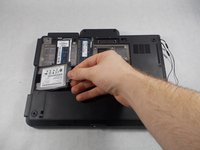
Pull out the hard drive and the small rubber sleigh that holds it.
-
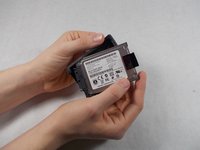
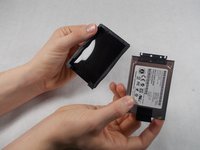
Pull the rubber sleigh off of the hard drive.
-
-


To reassemble your device, follow these instructions in reverse order.
Cancel: I did not complete this guide.
6 other people completed this guide.

Team

UMass Dartmouth, Team S8-G4, Valliere Spring 2018 Member of UMass Dartmouth, Team S8-G4, Valliere Spring 2018
UMASSD-VALLIERE-S18S8G4
3 Members
72 Guides authored
1 Guide Comment
You can use any mSATA SSD as replacement by using the following caddy/adapter:
https://www.ebay.fr/itm/165266235415
jacques_06
