Free Shipping on Domestic Orders $75+

HP ElitePad 900 Home Button Replacement

What you need

  1. HP ElitePad 900 Home Button Replacement, Front Panel Assembly: step 1, image 1 of 1
    • Unscrew the two 2.8mm Phillips #000 screws near the power connector.

    Ask FixBot

    Add Comment

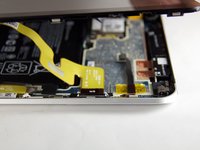
  2. HP ElitePad 900 Home Button Replacement: step 2, image 1 of 2 HP ElitePad 900 Home Button Replacement: step 2, image 2 of 2
    • Use a suction cup to pull the display assembly up.

    Ask FixBot

    Add Comment

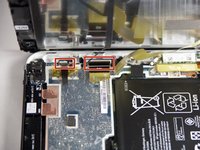
  3. HP ElitePad 900 Home Button Replacement: step 3, image 1 of 2 HP ElitePad 900 Home Button Replacement: step 3, image 2 of 2
    • Use the tip of a spudger to disconnect the two display ZIF connectors.

    Ask FixBot

    Add Comment

  4. HP ElitePad 900 Home Button Replacement, Home Button: step 4, image 1 of 1
    • Remove the two 2.4mm Phillips #000 screws.

    Ask FixBot

    Add Comment

  5. HP ElitePad 900 Home Button Replacement: step 5, image 1 of 1
    • Lift metal bracket along with blue connector.

    Ask FixBot

    Add Comment

  6. HP ElitePad 900 Home Button Replacement: step 6, image 1 of 1
    • Replace connector.

    Ask FixBot

    Add Comment

Conclusion

To reassemble your device, follow these instructions in reverse order.

Cancel: I did not complete this guide.

One other person completed this guide.

Kyle Marques

Member since: 09/03/15

889 Reputation

6 Guides authored

Team

USF Tampa, Team 12-4, Blackwell Fall 2015 Member of USF Tampa, Team 12-4, Blackwell Fall 2015

USFT-BLACKWELL-F15S12G4

4 Members

6 Guides authored

0 Guide Comments

Add Comment

View Statistics:

Past 24 Hours: 0

Past 7 Days: 3

Past 30 Days: 23

All Time: 921