Introduction
This guide will help you remove the battery from your HP EliteBook x360 830 G7 laptop. If the battery of your HP EliteBook x360 830 G7 is draining fast recently, it is probably dying and needs to be replaced.
Batteries are important components of laptops, and without a functional battery your laptop might not perform in the desired manner. Batteries have a limited lifecycle, and after several charge cycles, they might start to drain quicker than usual. If this is happening with you, you might want to start by calibrating the battery. If the problem persists, you most likely need to replace the battery.
This guide will teach you how to replace your HP EliteBook x360 830 G7 battery safely and effectively. Make sure to power down your device before you start.
What you need
-
-
-
Turn the computer over so that the back is facing up.
-
Use a Torx T5 screwdriver to remove the three 9 mm screws from the hinge of the device.
-
Use a Torx T5 screwdriver to remove the two 7 mm screws from the left and right mid-section of the case.
-
Lift the backplate from the computer.
 Ask FixBot
-
-
-
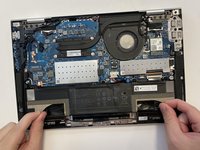
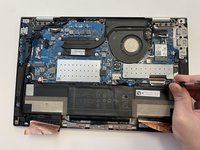
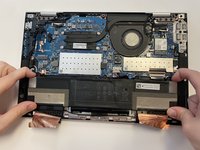
Use a nylon spudger to gently disconnect the battery's bundled cable connector from the motherboard.
-
-
-
-
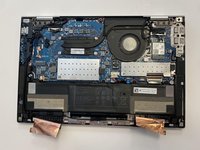
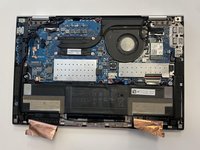
Peel back both sides of the copper foil tape connected to the battery.
-
-
-
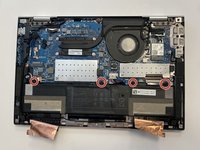
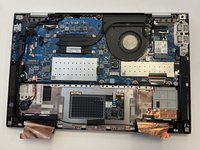
Use a JIS #1 screwdriver to remove the four 4 mm screws that secure the battery.
-
-






To reassemble your device, follow these instructions in reverse order.

Team

University of Alabama, Team 2-1, Bedsole Spring 2022 Member of University of Alabama, Team 2-1, Bedsole Spring 2022
UA-BEDSOLE-S22S2G1
4 Members
59 Guides authored
