
HP EliteBook 8560p Hard Drive Replacement

Isaiah Villalobos and 2 other contributors
Last updated on Jun 19, 2024
Views: 1.3K
View statistics:
- Past 24 Hours:
- 3
- Past 7 Days:
- 16
- Past 30 Days:
- 101
- All Time:
- 1,275
Comments: 0
No one has left comments on this guide. Will you be first?
Go to guide commentsCompleted: 0 1
No one has marked this guide "completed." Will you be the first?
1 person has marked this guide "completed." It's you — great job!
Favorites: 0 1
No one has favorited (and subscribed to) this guide. Will you be the first?
1 person has favorited (and subscribed to) this guide — and that's you!
Featured Student Guide
This guide has been the hard work of our awesome students and is found to be exceptionally cool by the iFixit staff.
Introduction
Go to step 1 ↓There are many reasons why you might need to replace a hard drive, including hardware failure, corruption, or insufficient space. These issues can lead to lags, blue screens, file loss, frozen programs, and other symptoms on your device. This guide demonstrates how to replace the hard drive on an HP EliteBook 8560p.
Be aware that when replacing a hard drive, you may or may not need to reinstall your operating system. Before you begin, backup any important documents or files in case of any issues during the repair. Turn off your laptop and unplug it from the charger.
What you need
Tools


-
-
-
Slide and hold the battery lock all the way to the left.
-
While holding the lock open, slide the battery up and out.
-
-
-
Slide and hold the back cover lock all the way to the right.
-
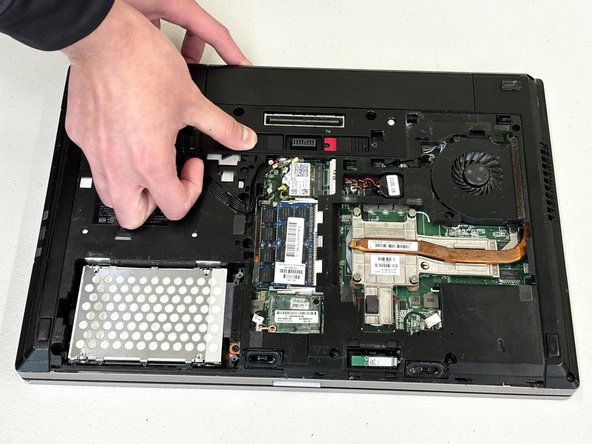
While holding the lock all the way to the right, slide the back cover down and lift the cover.
-
-
-
-
Slide the battery back into place.
-
Slide the battery lock to the right to secure the battery.
-
-
-
Replace the back cover.
-
While pushing the back cover upwards, slide the back cover lock to the left.
-

 Ask FixBot




Make sure to keep your available data space at an optimal level to ensure that your device runs at a normal pace.

Team

CSU Los Angeles, Team 8-4, Grodsky Spring 2024 Member of CSU Los Angeles, Team 8-4, Grodsky Spring 2024
CSULA-GRODSKY-S24S8G4
2 Members
12 Guides authored
