Introduction
How to replace the battery of a HP EliteBook 745 G4 laptop. The images and information in this guide were taken from this computer's service manual.
What you need
-
-
-
Turn off the computer. If you are unsure whether the computer is off or in Hibernation, turn the computer on, and then shut it down through the operating system.
-
Disconnect the power from the computer by unplugging the power cord from the computer.
-
Disconnect all external devices from the computer.
-
Turn the computer upside down on a flat surface.
 Ask FixBot
-
-
-
Remove the 10 rubber plugs from the bottom cover.
-
Remove the SD card blank from the bottom cover.
-
-
-
-
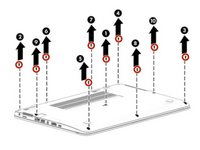
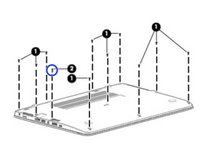
Remove the 10 Phillips PM2.5x5.0 screws in the following order.
-
After you remove the PM2.5×5.0 screws, remove the PM2.0×7.0 screw.
-
-
-
Pry up on the top (near the display hinge) of the bottom cover to disengage it from the computer. Consider using a spudger.
-
-
-
Loosen the two captive screws and remove the battery from the computer
-
-




To replace the battery & reassemble your device, follow these instructions in reverse order.
Cancel: I did not complete this guide.
6 other people completed this guide.

3 Guide Comments
super leicht
Gilt auch für 745 G3, danke.
