Introduction
Use this guide to replace the solid state drive in an HP EliteBook 725 G4.
This laptop can use a 2.5-inch SATA hard drive, an M.2 SATA SSD, or an NVMe SSD. Replacing the drive may improve storage space and performance or resolve problems caused by a failing drive.
What you need
-
-
-
Turn off the computer and make sure the computer is not plugged in.
-
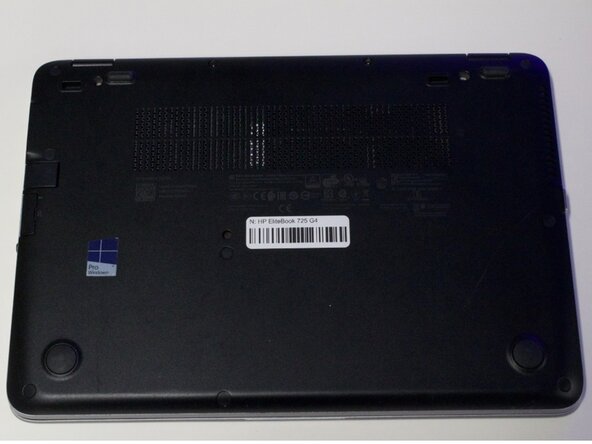
Flip the laptop over on its top.
 Ask FixBot
-
-
-
Remove eleven 5 mm screws using a Phillips #0 screwdriver.
-
Remove the SD card insert.
-
Remove the last screw under the SD card insert.
-
-
-
-
-
-
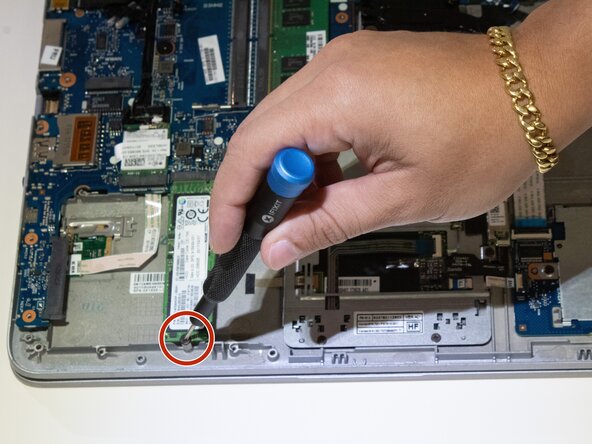
Remove the one 4 mm screw from the frame.
-
Lift the hard drive out of the laptop.
-
-





To reassemble your device, follow these instructions in reverse order.

Team

Austin Community College, Team 1-1, Anderson Summer 2026 Member of Austin Community College, Team 1-1, Anderson Summer 2026
AUSTINCC-ANDERSON-SU26S1G1
4 Members
30 Guides authored
