Free Shipping on Domestic Orders $75+

HP EliteBook 725 G3 Motherboard Replacement

What you need

    1. HP EliteBook 725 G3 Motherboard Replacement, Battery: step 1, image 1 of 1
      • Remove the two 2.5 mm Phillips #00 screws securing the battery.

      Ask FixBot

      Add Comment

    2. HP EliteBook 725 G3 Motherboard Replacement: step 2, image 1 of 3 HP EliteBook 725 G3 Motherboard Replacement: step 2, image 2 of 3 HP EliteBook 725 G3 Motherboard Replacement: step 2, image 3 of 3
      • Lift and remove the battery.

      Ask FixBot

      Add Comment

    1. HP EliteBook 725 G3 Motherboard Replacement, Fan and Heat Sink Assembly: step 3, image 1 of 2 HP EliteBook 725 G3 Motherboard Replacement, Fan and Heat Sink Assembly: step 3, image 2 of 2
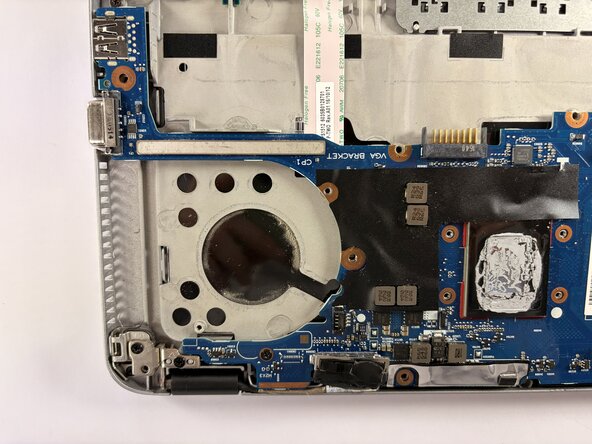
      • Remove the six 2.5 mm-long Phillips #00 screws securing the fan and heat sink assembly.

      Ask FixBot

      Add Comment

    2. HP EliteBook 725 G3 Motherboard Replacement: step 4, image 1 of 3 HP EliteBook 725 G3 Motherboard Replacement: step 4, image 2 of 3 HP EliteBook 725 G3 Motherboard Replacement: step 4, image 3 of 3
      • Push the fan and heat sink assembly directly out of its socket with the tip of a spudger or your fingernails.

      Ask FixBot

      Add Comment

    3. HP EliteBook 725 G3 Motherboard Replacement: step 5, image 1 of 2 HP EliteBook 725 G3 Motherboard Replacement: step 5, image 2 of 2
      • Lift the fan and heat sink assembly up and away from the motherboard to remove it.

      Ask FixBot

      Add Comment

    1. HP EliteBook 725 G3 Motherboard Replacement, Wi-Fi Card: step 6, image 1 of 2 HP EliteBook 725 G3 Motherboard Replacement, Wi-Fi Card: step 6, image 2 of 2
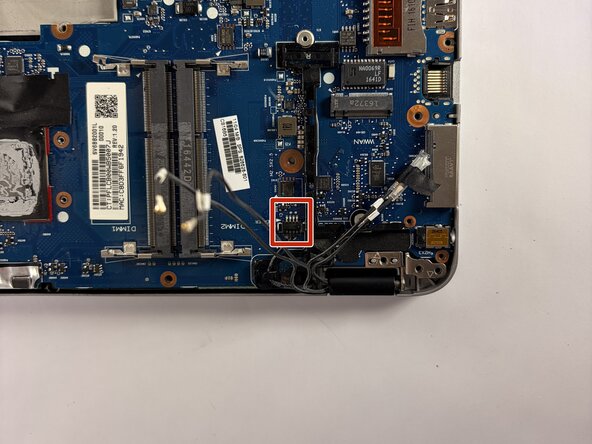
      • Remove the single Phillips #00 screw securing the Wi-Fi card.

      • Use the pointed end of a spudger to pry up and disconnect the two coaxial connectors.

      Ask FixBot

      Add Comment

    2. HP EliteBook 725 G3 Motherboard Replacement: step 7, image 1 of 3 HP EliteBook 725 G3 Motherboard Replacement: step 7, image 2 of 3 HP EliteBook 725 G3 Motherboard Replacement: step 7, image 3 of 3
      • Pull the Wi-Fi card directly out of its socket.

      Ask FixBot

      Add Comment

    1. HP EliteBook 725 G3 Motherboard Replacement, SSD: step 8, image 1 of 1
      • Remove the single Phillips #00 screw securing the SSD.

      Ask FixBot

      Add Comment

    2. HP EliteBook 725 G3 Motherboard Replacement: step 9, image 1 of 3 HP EliteBook 725 G3 Motherboard Replacement: step 9, image 2 of 3 HP EliteBook 725 G3 Motherboard Replacement: step 9, image 3 of 3
      • Pull the SSD directly out of its socket.

      Ask FixBot

      Add Comment

    1. HP EliteBook 725 G3 Motherboard Replacement, RAM Stick: step 10, image 1 of 2 HP EliteBook 725 G3 Motherboard Replacement, RAM Stick: step 10, image 2 of 2
      • Two clips secure the RAM module in place, one on each side. Using your fingers, spread the clips away from the RAM module.

      Ask FixBot

      Add Comment

    2. HP EliteBook 725 G3 Motherboard Replacement: step 11, image 1 of 2 HP EliteBook 725 G3 Motherboard Replacement: step 11, image 2 of 2
      • Gently pull the RAM module directly out of its socket.

      Ask FixBot

      Add Comment

    1. HP EliteBook 725 G3 Motherboard Replacement, Motherboard: step 12, image 1 of 3 HP EliteBook 725 G3 Motherboard Replacement, Motherboard: step 12, image 2 of 3 HP EliteBook 725 G3 Motherboard Replacement, Motherboard: step 12, image 3 of 3
      • Remove the ten 2.5 mm-long Phillips #00 screws securing the motherboard.

      Ask FixBot

      Add Comment

    2. HP EliteBook 725 G3 Motherboard Replacement: step 13, image 1 of 2 HP EliteBook 725 G3 Motherboard Replacement: step 13, image 2 of 2
      • Flip up the black locking flap securing the ribbon cable and disconnect the cable.

      Ask FixBot

      Add Comment

    3. HP EliteBook 725 G3 Motherboard Replacement: step 14, image 1 of 3 HP EliteBook 725 G3 Motherboard Replacement: step 14, image 2 of 3 HP EliteBook 725 G3 Motherboard Replacement: step 14, image 3 of 3
      • Disconnect the small group of wires near the hinge of the laptop by gently squeezing the sides and pulling it out

      Ask FixBot

      Add Comment

    4. HP EliteBook 725 G3 Motherboard Replacement: step 15, image 1 of 2 HP EliteBook 725 G3 Motherboard Replacement: step 15, image 2 of 2
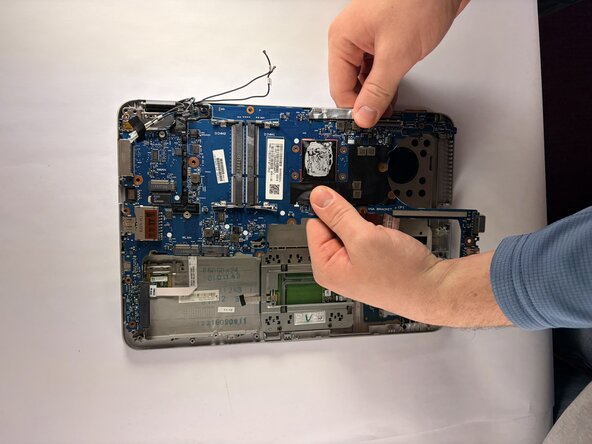
      • Gently grab the motherboard and slowly maneuver it out.

      Ask FixBot

      Add Comment

Conclusion

To reassemble your device, follow the above steps in reverse order.
Take your e-waste to an R2 or e-Stewards certified recycler.
Repair didn’t go as planned? Try some basic troubleshooting or ask our Answers community for help.

Cancel: I did not complete this guide.

Owenbart

Member since: 10/15/25

376 Reputation

4 Guides authored

Team

UMass Dartmouth, Team 1-4, Botvin Fall 2025 Member of UMass Dartmouth, Team 1-4, Botvin Fall 2025

UMASSD-BOTVIN-F25S1G4

3 Members

72 Guides authored

0 Guide Comments

Add Comment

View Statistics:

Past 24 Hours: 0

Past 7 Days: 7

Past 30 Days: 32

All Time: 176