
HP Deskjet 1000 J110a Paper Control Sensor Replacement

Colin Tourjee and 3 other contributors
Last updated on May 7, 2024
Views: 3.2K
View statistics:
- Past 24 Hours:
- 0
- Past 7 Days:
- 16
- Past 30 Days:
- 107
- All Time:
- 3,229
Comments: 2
2 comments on steps.
Completed: 4 5
4 people have marked this guide "completed." Will you be next?
5 people have marked this guide "completed." Including you — great job!
Favorites: 0 1
No one has favorited (and subscribed to) this guide. Will you be the first?
1 person has favorited (and subscribed to) this guide — and that's you!
Introduction
Go to step 1 ↓If your printer is not dispensing paper, and it makes no sense, the Paper Control Sensor may not be sensing the paper. The Paper Control Sensor is soldered to a small circuit board. Be careful when handling electronic circuits to avoid damaging it or to avoid damaging yourself. This guide will walk you through on how to replace the Paper Control Sensor.
What you need
Tools


-
-
-
Remove the two 13 mm screws located on the back of the printer using a screwdriver with the T10 torx bit (star-shaped).
 Ask FixBot
-
-
-
In the front of the printer, open the tray where the paper comes out and remove the two 13 mm screws located under the top of the printer.
-
-
-
With the front of the printer facing you, lift and raise the left side of the panel (like opening a book in reverse) until it disconnects from the clip on the right side of the panel.
-
-
-
-
Tool used on this step:Tweezers$4.99
-
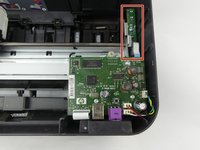
Locate the paper control sensor.
-
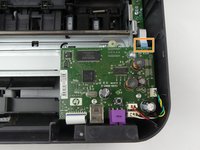
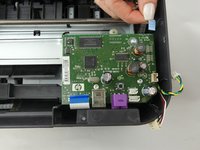
Locate and unplug the connector which connects the sensor board to the main circuit board.
-
-
-
-
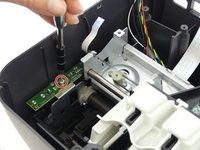
Locate and remove the 8mm screw with a screwdriver and the T10 torx bit, then remove the paper control sensor board.
-
-




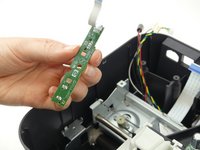
To reassemble your device, follow these instructions in reverse order.
Cancel: I did not complete this guide.
4 other people completed this guide.

Team

USF Tampa, Team S5-G3, Passmore Spring 2018 Member of USF Tampa, Team S5-G3, Passmore Spring 2018
USFT-PASSMORE-S18S5G3
4 Members
72 Guides authored
