
HP Compaq nc6400 RAM Replacement

Luis Vazquez and 7 other contributors
Last updated on Jul 15, 2014
Views: 5.1K
View statistics:
- Past 24 Hours:
- 3
- Past 7 Days:
- 20
- Past 30 Days:
- 116
- All Time:
- 5,079
Comments: 2
2 comments on steps.
Completed: 5 6
5 people have marked this guide "completed." Will you be next?
6 people have marked this guide "completed." Including you — great job!
Favorites: 1 2
1 person has favorited (and subscribed to) this guide. Will you be next?
2 people have favorited (and subscribed to) this guide — including you!
Introduction
Go to step 1 ↓RAM stands for Random Access Memory. This memory allows your computer to access recently used data more quickly. This guide will take you through the process of replacing the RAM in an HP Compaq nc6400 Laptop. You will need the correct replacement or compatible RAM for your laptop to complete the installation.
What you need
Tools
-
Spudger4.9


-
-
-
Locate the battery lock below the battery labeled one.
-
Slide the lock all the way to the left to release the left lock of the battery.
-
-
-
Locate the lock labeled two at the bottom right corner below the battery.
-
Slide and hold the lock to the left.
-
-
-
-
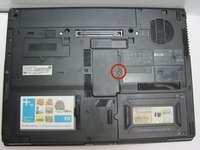
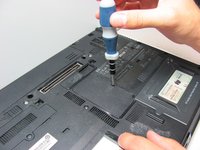
Once the screw is removed, use a spudger to pry open the case covering the RAM chip.
-
-
-
-
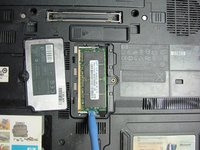
Use a plastic opening tool to pull back the white clip holding the RAM chip in place.
-
Once the plastic opening tool has disengaged the clip from the RAM chip, keep the plastic opening tool locked into place.
-
-
-
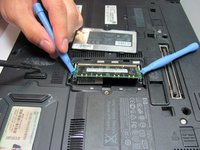
With a second plastic opening tool,repeat the above process
-
After both plastic opening tools have been locked in place, the RAM chip should pop out about 1/4 of a inch.
-
-
-
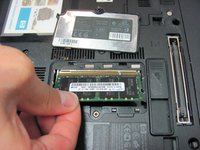
Grab the RAM chip with your thumb and index finger
-
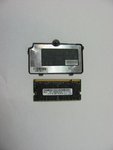
Carefully pull the RAM chip out
-

 Ask FixBot






To reassemble your device, follow these instructions in reverse order.
Cancel: I did not complete this guide.
5 other people completed this guide.

Team

Cal Poly, Team 14-6, Forte Fall 2013 Member of Cal Poly, Team 14-6, Forte Fall 2013
CPSU-FORTE-F13S14G6
5 Members
60 Guides authored
