
HP Compaq 6910p Processor Replacement

Tyler Fricks and 4 other contributors
Last updated on Dec 14, 2017
Views: 5.4K
View statistics:
- Past 24 Hours:
- 3
- Past 7 Days:
- 14
- Past 30 Days:
- 102
- All Time:
- 5,379
Comments: 0
No one has left comments on this guide. Will you be first?
Go to guide commentsCompleted: 7 8
7 people have marked this guide "completed." Will you be next?
8 people have marked this guide "completed." Including you — great job!
Favorites: 1 2
1 person has favorited (and subscribed to) this guide. Will you be next?
2 people have favorited (and subscribed to) this guide — including you!
Introduction
Go to step 1 ↓In this guide, we will illustrate how to remove and replace the processor of this device. Required tools include one Phillips screwdriver, one T9 Torx screwdriver, Arctic Silver Thermal Paste, and thumbs of course. Because the processor is difficult to find, patience will be required as well.
What you need
Tools


-
-
-
Turn the laptop upside down.
-
Remove the fourteen 1.5 cm Phillips's #1 screws.
-
Remove the battery.
-
Remove three 0.3 cm Phillips #1 screws in the battery compartment.
 Ask FixBot
-
-
-
Slide the tabs upward to release the keyboard
-
Lift up the keyboard
-
Disconnect the cables attaching the keyboard to the laptop by lifting up the release tabs.
-
-
-
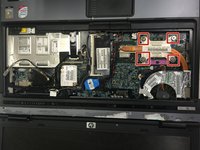
Loosen the four 1.5 cm Phillips #1 screws indicated in red.
-
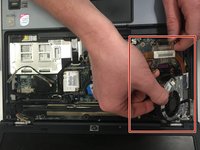
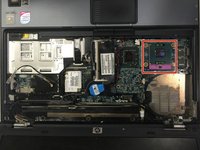
Remove the heat sink to reveal the processor.
-
-
-



To reassemble your device, follow these instructions in reverse order.
Cancel: I did not complete this guide.
7 other people completed this guide.

Team

Montana Tech, Team 3-2, Shirk Fall 2015 Member of Montana Tech, Team 3-2, Shirk Fall 2015
MTUM-SHIRK-F15S3G2
5 Members
60 Guides authored
