
HP Compaq 6910p Keyboard Replacement

Tyler Fricks and 2 other contributors
Last updated on Dec 24, 2015
Views: 3.9K
View statistics:
- Past 24 Hours:
- 2
- Past 7 Days:
- 19
- Past 30 Days:
- 108
- All Time:
- 3,883
Comments: 0
No one has left comments on this guide. Will you be first?
Go to guide commentsCompleted: 5 6
5 people have marked this guide "completed." Will you be next?
6 people have marked this guide "completed." Including you — great job!
Favorites: 0 1
No one has favorited (and subscribed to) this guide. Will you be the first?
1 person has favorited (and subscribed to) this guide — and that's you!
Introduction
Go to step 1 ↓In this guide, we will illustrate how to remove and possibly replace the keyboard of this device. The only tools required are thumbs and a Phillips screwdriver.
What you need
Tools

-
-
-
Loosen the three 1.5 cm Phillips #1 screws for the keyboard on the back of the laptop.
 Ask FixBot
-
-
-
-
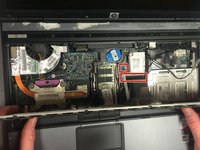
Lift up the keyboard.
-
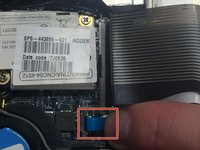
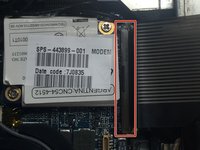
Release both cables that attach the keyboard to the laptop by lifting up the indicated release latches.
-
-


To reassemble your device, follow these instructions in reverse order.
Cancel: I did not complete this guide.
5 other people completed this guide.

Team

Montana Tech, Team 3-2, Shirk Fall 2015 Member of Montana Tech, Team 3-2, Shirk Fall 2015
MTUM-SHIRK-F15S3G2
5 Members
60 Guides authored
