
HP Compaq 515 Keyboard Replacement

Kirsten Harnden and 3 other contributors
Last updated on Jun 5, 2018
Views: 861
View statistics:
- Past 24 Hours:
- 1
- Past 7 Days:
- 8
- Past 30 Days:
- 72
- All Time:
- 861
Comments: 0
No one has left comments on this guide. Will you be first?
Go to guide commentsCompleted: 0 1
No one has marked this guide "completed." Will you be the first?
1 person has marked this guide "completed." It's you — great job!
Favorites: 0 1
No one has favorited (and subscribed to) this guide. Will you be the first?
1 person has favorited (and subscribed to) this guide — and that's you!
Introduction
Go to step 1 ↓Removing the keyboard takes some patience but it isn't outrageously difficult. The only tools needed for this replacement guide are the PH1 screwdriver bit and the plastic spudger. Make sure to keep the two screws that are removed in a safe place so you don't lose them. Make sure the device is off before starting this guide. Be careful to not be too aggressive with the keyboard, it does take some force to separate it from the rest of the device but try to still be as gentle as possible.
What you need
Tools
-
Spudger4.9


-
-
-
Turn the laptop over, the screws for the keyboard are in the middle and left of the device
 Ask FixBot
-
-
-
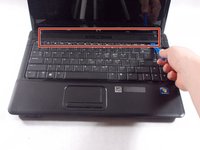
Gently use a plastic spudger to remove the plastic holder at the top of the keyboard
-
-
-
-
Carefully unclip and remove the large black wire that is connecting the keyboard to the laptop
-
-


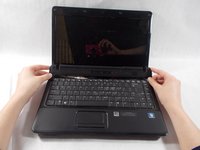


To reassemble your device, follow these instructions in reverse order.

Team

UMass Dartmouth, Team S4-G1, Covino Spring 2018 Member of UMass Dartmouth, Team S4-G1, Covino Spring 2018
UMASSD-COVINO-S18S4G1
3 Members
60 Guides authored
