Free Shipping on Domestic Orders $75+

HP Chromebook 11 G3 Battery Replacement

What you need

  1. HP Chromebook 11 G3 Battery Replacement, Keyboard Mount: step 1, image 1 of 2 HP Chromebook 11 G3 Battery Replacement, Keyboard Mount: step 1, image 2 of 2
    • Flip the laptop upside down so that the lid lies flat on the table.

    • Remove the nine 6mm Phillips #00 screws that line the border.

    Ask FixBot

    Add Comment

  2. HP Chromebook 11 G3 Battery Replacement: step 2, image 1 of 2 HP Chromebook 11 G3 Battery Replacement: step 2, image 2 of 2
    Tool used on this step:
    Tweezers
    $4.99
    Buy
    • Remove the two rubber feet closest to the hinge using tweezers.

    • Remove the two 6mm Phillips #00 screws revealed under these rubber feet.

    • The rubber feet may tear while removal; preventing this can be difficult, but it won’t harm the laptop. If desired, replace these rubber feet during reassembly.

    Ask FixBot

    Add Comment

  3. HP Chromebook 11 G3 Battery Replacement: step 3, image 1 of 1
    • Flip the laptop so it is in the upright position.

    • Open the lid.

    • Unsnap the keyboard mount along the border of the laptop using a plastic opening tool.

    • This may require more force than expected. Hearing loud clicks as the plastic opening tool slides along the seam is normal.

    Ask FixBot

    Add Comment

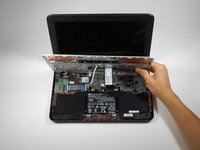
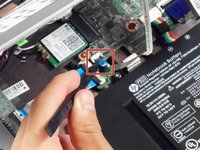
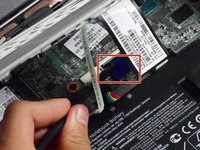
  4. HP Chromebook 11 G3 Battery Replacement: step 4, image 1 of 3 HP Chromebook 11 G3 Battery Replacement: step 4, image 2 of 3 HP Chromebook 11 G3 Battery Replacement: step 4, image 3 of 3
    • Tilt the keyboard mount up.

    • Use a spudger to flip up the two ZIF connector retaining flaps for the ribbon cables that connect the keyboard mount to the motherboard.

    • Gently remove both ribbon cables.

    Ask FixBot

    Add Comment

  5. HP Chromebook 11 G3 Battery Replacement: step 5, image 1 of 1
    • Lift the keyboard mount out of the laptop.

    Ask FixBot

    Add Comment

  6. HP Chromebook 11 G3 Battery Replacement, Battery: step 6, image 1 of 1
    • Gently remove the battery’s rainbow-colored bundled cable from the motherboard.

    Ask FixBot

    Add Comment

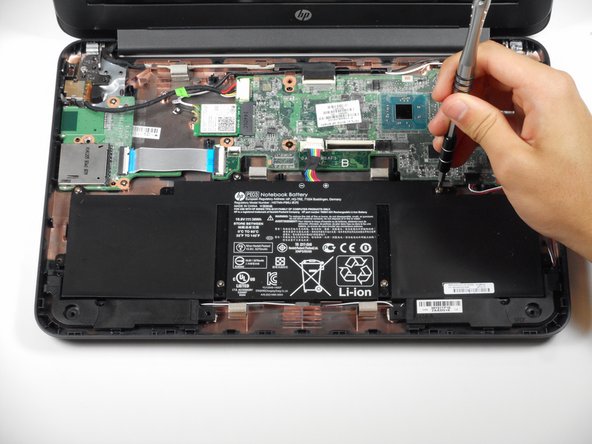
  7. HP Chromebook 11 G3 Battery Replacement: step 7, image 1 of 2 HP Chromebook 11 G3 Battery Replacement: step 7, image 2 of 2
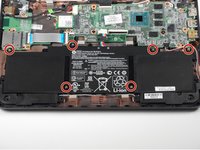
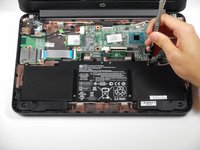
    • Remove the six 4 mm Phillips #00 screws located along the perimeter of the battery.

    Ask FixBot

    Add Comment

  8. HP Chromebook 11 G3 Battery Replacement: step 8, image 1 of 1
    • Lift out the battery.

    • The laptop may tip backwards onto its lid due to uneven weight distribution.

    Ask FixBot

    Add Comment

Conclusion

To reassemble your device, follow these instructions in reverse order.

Cancel: I did not complete this guide.

6 other people completed this guide.

Rahul Goyal

Member since: 04/26/17

1,401 Reputation

10 Guides authored

Team

Cal Poly, Team S23-G3, Livingston Spring 2017 Member of Cal Poly, Team S23-G3, Livingston Spring 2017

CPSU-LIVINGSTON-S17S23G3

4 Members

12 Guides authored

1 Guide Comment

Can the HP Chromebook 11 G3 be operated from the power adapter after the battery has been removed?

Andrew Logan - Reply Share

Add Comment

View Statistics:

Past 24 Hours: 1

Past 7 Days: 9

Past 30 Days: 35

All Time: 4,479