Free Shipping on Domestic Orders $75+

HP Chromebook 14-x013dx Battery Replacement

What you need

  1. HP Chromebook  14-x013dx Battery Replacement, Keyboard, Touchpad: step 1, image 1 of 2 HP Chromebook  14-x013dx Battery Replacement, Keyboard, Touchpad: step 1, image 2 of 2
    • Using the plastic spudger, gently lift the 5 rubber pads away from their seating.

    Ask FixBot

    Add Comment

  2. HP Chromebook  14-x013dx Battery Replacement: step 2, image 1 of 1
    • Remove the five 6mm screws located under the removed pads using Phillips #00 screwdriver.

    Ask FixBot

    Add Comment

  3. HP Chromebook  14-x013dx Battery Replacement: step 3, image 1 of 2 HP Chromebook  14-x013dx Battery Replacement: step 3, image 2 of 2
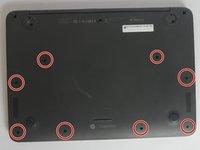
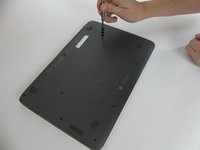
    • With the Phillips #00 screwdriver, remove the remaining eight 6mm screws. You will now have thirteen 6mm screws removed from the case.

    Ask FixBot

    Add Comment

  4. HP Chromebook  14-x013dx Battery Replacement: step 4, image 1 of 2 HP Chromebook  14-x013dx Battery Replacement: step 4, image 2 of 2
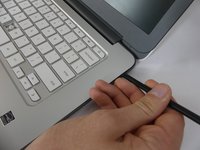
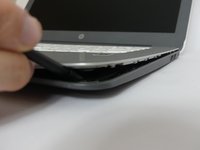
    • To continue removing the back cover, turn the laptop over as displayed.

    • Use the plastic spudger to gently pry around the base of the laptop from the back cover. Continue prying around the entire base of the laptop.

    Ask FixBot

    Add Comment

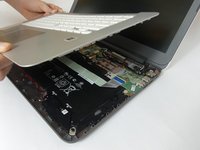
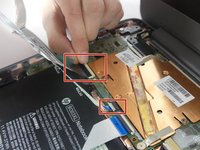
  5. HP Chromebook  14-x013dx Battery Replacement: step 5, image 1 of 3 HP Chromebook  14-x013dx Battery Replacement: step 5, image 2 of 3 HP Chromebook  14-x013dx Battery Replacement: step 5, image 3 of 3
    • Gently lift the silver base of the laptop from the bottom, but do not remove it.

    • To remove the ribbon cables, lift the latch holding the ribbon cables in place and then pull them free.

    • Remove the keyboard panel from the laptop.

    Ask FixBot

    Add Comment

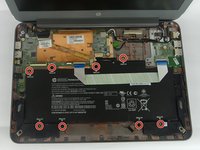
  6. HP Chromebook  14-x013dx Battery Replacement, Battery: step 6, image 1 of 2 HP Chromebook  14-x013dx Battery Replacement, Battery: step 6, image 2 of 2
    • Remove the eight 4mm screws holding the battery in place using the Phillips #00 screwdriver.

    Ask FixBot

    Add Comment

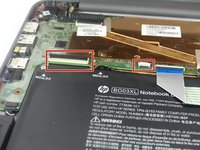
  7. HP Chromebook  14-x013dx Battery Replacement: step 7, image 1 of 2 HP Chromebook  14-x013dx Battery Replacement: step 7, image 2 of 2
    • Remove the ribbon cable that runs over the battery by lifting up the plastic latches and pulling the cable away.

    Ask FixBot

    Add Comment

  8. HP Chromebook  14-x013dx Battery Replacement: step 8, image 1 of 2 HP Chromebook  14-x013dx Battery Replacement: step 8, image 2 of 2
    • Unhook the battery's power connector from the motherboard.

    Ask FixBot

    Add Comment

  9. HP Chromebook  14-x013dx Battery Replacement: step 9, image 1 of 1
    • Lift the battery out of the laptop case.

    Ask FixBot

    Add Comment

Conclusion

To reassemble your device, follow these instructions in reverse order.

Cancel: I did not complete this guide.

3 other people completed this guide.

NHerbert

Member since: 09/28/17

602 Reputation

5 Guides authored

Team

USF Tampa, Team S3-G6, Nance Fall 2017 Member of USF Tampa, Team S3-G6, Nance Fall 2017

USFT-NANCE-F17S3G6

4 Members

5 Guides authored

0 Guide Comments

Add Comment

View Statistics:

Past 24 Hours: 0

Past 7 Days: 2

Past 30 Days: 20

All Time: 3,317