
HP 8 1401 Battery Replacement

Katie Presz and 3 other contributors
Last updated on Mar 4, 2024
Views: 1.3K
View statistics:
- Past 24 Hours:
- 0
- Past 7 Days:
- 12
- Past 30 Days:
- 51
- All Time:
- 1,349
Comments: 0
No one has left comments on this guide. Will you be first?
Go to guide commentsCompleted: 0 1
No one has marked this guide "completed." Will you be the first?
1 person has marked this guide "completed." It's you — great job!
Favorites: 0 1
No one has favorited (and subscribed to) this guide. Will you be the first?
1 person has favorited (and subscribed to) this guide — and that's you!
Introduction
Go to step 1 ↓This guide is helpful if you need to replace a dead or damaged battery. Be careful when removing the battery to not bend or puncture it because it may contain hazardous chemicals.
What you need
Tools
-
-
Spudger4.9
-


-
-
-
Using a Torx T4 screwdriver, remove the four 5 mm screws on the back panel.
 Ask FixBot
-
-
-
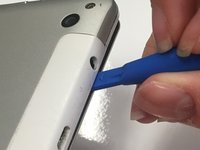
Insert the tip of a plastic opening tool in the seam between the front and back panels.
-
-
-
Slide the plastic opening tool around all edges of the device until the back panel detaches.
-
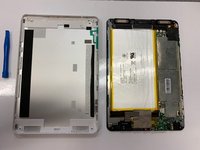
Lift off the back panel.
-
-
-
-
-
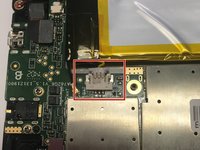
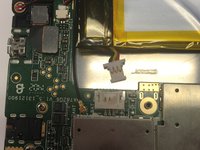
Using a spudger or your fingers, disconnect the power cable by sliding the connector out of the socket on the motherboard.
-
-
-
Tool used on this step:Plastic Cards$2.99
-
Using a plastic card or a nylon spudger, carefully pry the battery from the adhesive on the tablet.
-
-






To reassemble your device, follow these instructions in reverse order.

Team

University of Alabama, Team S1-G1, Bedsole Spring 2019 Member of University of Alabama, Team S1-G1, Bedsole Spring 2019
UA-BEDSOLE-S19S1G1
4 Members
72 Guides authored
