Free Shipping on Domestic Orders $75+

HP 7 Plus 1302 Speaker Replacement

What you need

    1. HP 7 Plus 1302 Speaker Replacement, Back Cover: step 1, image 1 of 1
      • Using the T5 Torx Screwdriver, remove the T5x3mm screws located in all 4 corners.

      • Device should be turned off and unplugged before starting the replacements.

      Ask FixBot

      Add Comment

    2. HP 7 Plus 1302 Speaker Replacement: step 2, image 1 of 2 HP 7 Plus 1302 Speaker Replacement: step 2, image 2 of 2
      • Use the plastic opening tool to push in between the front and the back of the tablet.

      • Slide the plastic opening tool around all 4 sides of the tablet to separate the back cover.

      • Be careful when you are trying to remove the back as it can damage the screen if you force it too much.

      Ask FixBot

      Add Comment

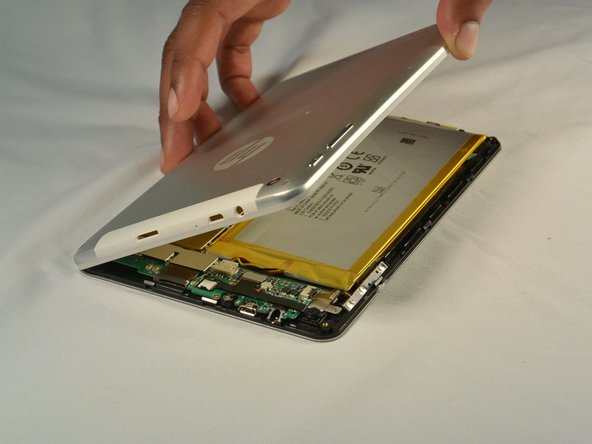
    3. HP 7 Plus 1302 Speaker Replacement: step 3, image 1 of 2 HP 7 Plus 1302 Speaker Replacement: step 3, image 2 of 2
      • Continue sliding the plastic opening tool around the tablet until all 4 sides are separated from each other.

      • Remove the back cover.

      Ask FixBot

      Add Comment

    1. HP 7 Plus 1302 Speaker Replacement, Speaker: step 4, image 1 of 1
      Tool used on this step:
      Tweezers
      $4.99
      Buy
      • Use tweezers to push out the speaker connector.

      Ask FixBot

      Add Comment

    2. HP 7 Plus 1302 Speaker Replacement: step 5, image 1 of 1
      • A thin strip of double sided tape secure sthe speaker to the device and is located beneath the speaker.

      • Use the flat end of spudger to pry out the speaker

      • Be careful when working the speaker away from the double-sided tape. Excessive force may damage the component.

      Ask FixBot

      Add Comment

    3. HP 7 Plus 1302 Speaker Replacement: step 6, image 1 of 1
      • Lift the speaker away from the device and replace it with the new one.

      Ask FixBot

      Add Comment

Conclusion

To reassemble your device, follow these instructions in reverse order.

Cancel: I did not complete this guide.

junlin16

Member since: 07/07/15

101 Reputation

1 Guide authored

Team

IUPUI, Team 1-2, Renguette SU 2015 Member of IUPUI, Team 1-2, Renguette SU 2015

IUPUI-RENGUETTE-SU15S1G2

5 Members

48 Guides authored

0 Guide Comments

Add Comment

View Statistics:

Past 24 Hours: 4

Past 7 Days: 32

Past 30 Days: 61

All Time: 614