Up to 20% off select tools
Free Shipping on Domestic Orders $75+

HP 550 Notebook LCD Display Replacement

Views: 3.6K

View statistics:

Past 24 Hours:
7
Past 7 Days:
24
Past 30 Days:
110
All Time:
3,555
Comments: 2

2 guide comments.

Go to guide comments
Completed: 3

3 people have marked this guide "completed." Will you be next?

Favorites: 2

2 people have favorited (and subscribed to) this guide. Will you be next?

Time Required: 1 hour
Difficulty: Moderate
Community-Contributed Guide

An awesome member of our community made this guide. It was not created by iFixit staff.

HP 550 Notebook LCD Display Replacement

What you need

Introduction

Go to step 1 ↓

Follow this guide to fix your LCD display.

    1. HP 550 Notebook LCD Display Replacement, LCD display: step 1, image 1 of 1
      • Remove the battery

      Ask FixBot

      Add Comment

    2. HP 550 Notebook LCD Display Replacement: step 2, image 1 of 3 HP 550 Notebook LCD Display Replacement: step 2, image 2 of 3 HP 550 Notebook LCD Display Replacement: step 2, image 3 of 3
      • Remove the 8 pads and the underlying screws

      Ask FixBot

      Add Comment

    3. HP 550 Notebook LCD Display Replacement: step 3, image 1 of 3 HP 550 Notebook LCD Display Replacement: step 3, image 2 of 3 HP 550 Notebook LCD Display Replacement: step 3, image 3 of 3
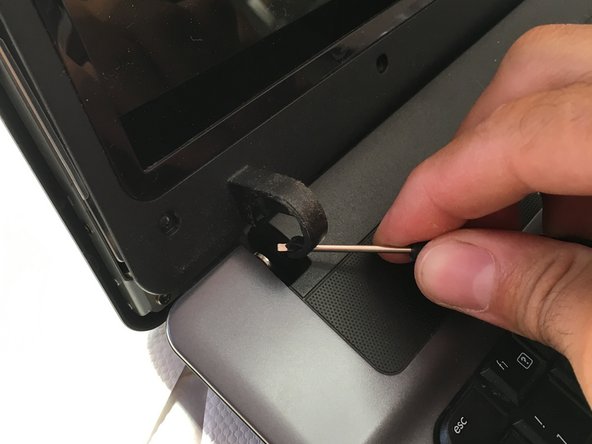
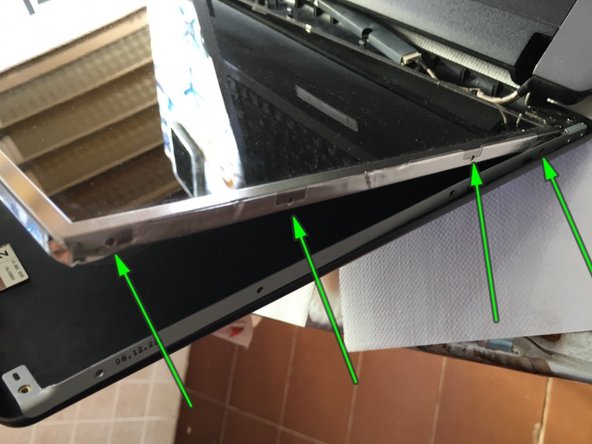
      • Use a thin tool to separate the lcd frame

      • Unhook the cover on the 2 hinges on the upper side

      Ask FixBot

      Add Comment

    4. HP 550 Notebook LCD Display Replacement: step 4, image 1 of 3 HP 550 Notebook LCD Display Replacement: step 4, image 2 of 3 HP 550 Notebook LCD Display Replacement: step 4, image 3 of 3
      • Remove the LCD cover with delicacy, paying attention to the wires and removing any adhesive if present.

      • Remove 4 lcd fixing screws on one side and 4 screws on the other

      • Force the back cover slightly to access the last screw on both sides

      Ask FixBot

      Add Comment

    5. HP 550 Notebook LCD Display Replacement: step 5, image 1 of 3 HP 550 Notebook LCD Display Replacement: step 5, image 2 of 3 HP 550 Notebook LCD Display Replacement: step 5, image 3 of 3
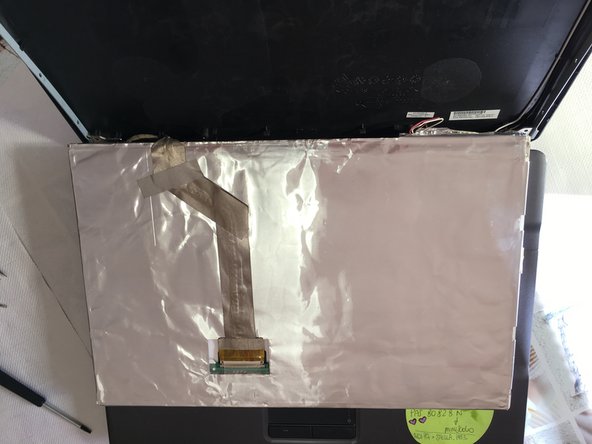
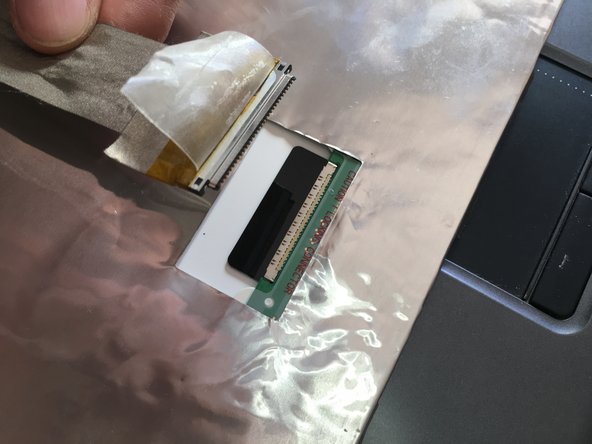
      • Disconnect the lcd panel connector

      • Gently lay the LCD panel on the keyboard.

      • Disconnect video display connector.

      Ask FixBot

      Add Comment

    6. HP 550 Notebook LCD Display Replacement: step 6, image 1 of 1
      • Remove the LCD panel and replace with the new one

      Ask FixBot

      Add Comment

Conclusion

To reassemble the device, follow these instructions in reverse order.

Cancel: I did not complete this guide.

3 other people completed this guide.

Special thanks to these translators:

it en

100%

These translators are helping us fix the world! Want to contribute?
Start translating ›

Author

with

Smilzo

Member since: 11/09/13

12,407 Reputation

39 Guides authored

2 Guide Comments

what are those two things on top labeled 1 and 2 in the last picture?

Vladut Prcsina - Reply Share

Non ho capito la domanda. Grazie

Smilzo - Reply Share

Add Comment

View Statistics:

Past 24 Hours: 7

Past 7 Days: 24

Past 30 Days: 110

All Time: 3,555