Free Shipping on Domestic Orders $75+

HP 15-r137wm TouchSmart CD Drive Replacement

What you need

    1. HP 15-r137wm TouchSmart CD Drive Replacement, Front Panel Assembly: step 1, image 1 of 3 HP 15-r137wm TouchSmart CD Drive Replacement, Front Panel Assembly: step 1, image 2 of 3 HP 15-r137wm TouchSmart CD Drive Replacement, Front Panel Assembly: step 1, image 3 of 3
      • Make sure that the device is powered off and unplugged before removing components.

      • Remove all ten (10) 5.5 mm Phillips #0 screws.

      • Remove the two (2) plastic tabs located at the rear of the panel. Locate the two (2) 7.5mm Phillips #0 screws underneath the pads and remove.

      Ask FixBot

      Add Comment

    2. HP 15-r137wm TouchSmart CD Drive Replacement: step 2, image 1 of 1
      Tool used on this step:
      Anti-Static Wrist Strap
      $7.95
      Buy
      • Use a wide plastic opening tool to pry off the top casing.

      • Be cautious not to crack the casing near the keyboard as it is quite fragile.

      • Lift the cover off carefully as there are wires still attached to internal components.

      • After panel is removed, use an anti-static wrist strap to ensure the motherboard does not get any external shocks from static discharge.

      Ask FixBot

      Add Comment

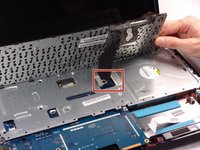
    3. HP 15-r137wm TouchSmart CD Drive Replacement: step 3, image 1 of 1
      • The connection for the track pad is still connected.

      • Move the keyboard slightly out of the way to locate the connection.

      • Disconnect the small wire protruding from the motherboard underneath the metal plate.

      Ask FixBot

      Add Comment

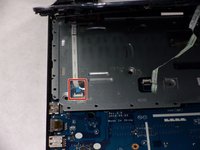
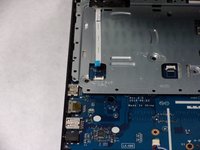
    4. HP 15-r137wm TouchSmart CD Drive Replacement: step 4, image 1 of 2 HP 15-r137wm TouchSmart CD Drive Replacement: step 4, image 2 of 2
      • Locate the connection between the power button and the connecting cable.

      • Do not lift the front panel off to far as the cable is still attached.

      • Remove the cable from the motherboard carefully.

      Ask FixBot

      Add Comment

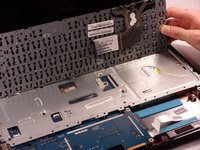
    1. HP 15-r137wm TouchSmart CD Drive Replacement, Keyboard: step 5, image 1 of 2 HP 15-r137wm TouchSmart CD Drive Replacement, Keyboard: step 5, image 2 of 2
      • Disconnect the connection between the keyboard the the motherboard.

      Ask FixBot

      Add Comment

    2. HP 15-r137wm TouchSmart CD Drive Replacement: step 6, image 1 of 2 HP 15-r137wm TouchSmart CD Drive Replacement: step 6, image 2 of 2
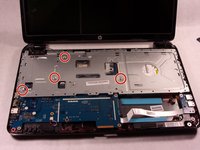
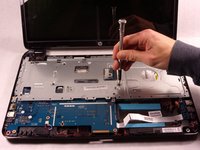
      • Remove the four (4) 2.5mm by 3.5mm Phillips #0 screws from the metal retaining plate.

      • Lift the metal retaining plate off and away from the device.

      Ask FixBot

      Add Comment

    1. HP 15-r137wm TouchSmart CD Drive Replacement, CD Drive: step 7, image 1 of 2 HP 15-r137wm TouchSmart CD Drive Replacement, CD Drive: step 7, image 2 of 2
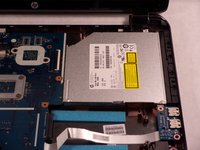
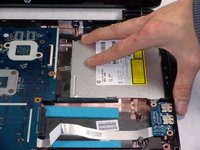
      • Slide the CD drive out slowly by pulling it to the right. There are no screws attached, but there is a connection to the motherboard.

      Ask FixBot

      Add Comment

Conclusion

To reassemble your device, follow these instructions in reverse order.

Cancel: I did not complete this guide.

Ross B Jacques

Member since: 10/18/17

881 Reputation

7 Guides authored

Team

0 Guide Comments

Add Comment

View Statistics:

Past 24 Hours: 0

Past 7 Days: 2

Past 30 Days: 13

All Time: 452