
HP 15-g071nr Battery Replacement

Emerson Tatelbaum and 4 other contributors
Last updated on Jan 10, 2025
Views: 650
View statistics:
- Past 24 Hours:
- 2
- Past 7 Days:
- 14
- Past 30 Days:
- 56
- All Time:
- 650
Comments: 0
No one has left comments on this guide. Will you be first?
Go to guide commentsCompleted: 2 3
2 people have marked this guide "completed." Will you be next?
3 people have marked this guide "completed." Including you — great job!
Favorites: 0 1
No one has favorited (and subscribed to) this guide. Will you be the first?
1 person has favorited (and subscribed to) this guide — and that's you!
Introduction
Go to step 1 ↓If your HP 15-g071nr laptop battery produces short use time, power issues, slow charge time, or even overheating, use this guide to safely and successfully replace the battery.
This three step guide is easy to follow and requires no tools to complete. Before following these steps, disconnect the device from any external power sources and power off the device completely.
-
-
-
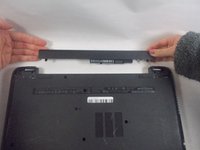
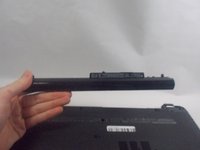
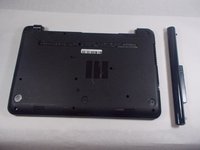
Press the tabs at the corners of the laptop at the same time to release the battery.
-
-


 Ask FixBot


To reassemble your device, follow these instructions in reverse order.
Cancel: I did not complete this guide.
2 other people completed this guide.

