Introduction
If your keyboard isn't responding, then you can replace it by using this guide. It is recommended that you have the tools suggested in this guide ready to use. This guide will walk you through step by step on how to replace the keyboard. Is the keyboard on your computer not working and you found out it costs a lot to have them fixed? Well you are in luck. The following guide consists of the steps to remove the keyboard from the computer while also showing you the pre-requeste steps to be able to remove the keyboard.
What you need
-
-
-
Flip the laptop over so that the bottom is facing you.
-
Slide the latch towards the center of the laptop so the unlock emblem appears.
 Ask FixBot
-
-
-
Place your finger on the left latch and slide it towards the center of the laptop to remove the battery.
-
-
-
-
-
-
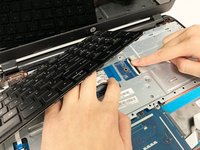
Take the keyboard and the section of the panel surrounding the keyboard apart.
-
-
-
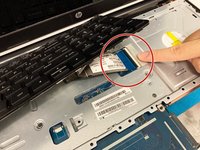
Lift the flip covering the connection port and remove the connecting strip to detach the keyboard from the motherboard.
-


To reassemble your device, follow these instructions in reverse order.
Cancel: I did not complete this guide.
One other person completed this guide.

Team

Duke University Pratt School of Engineering, Team S6-G4, Matos-Garner Fall 2019 Member of Duke University Pratt School of Engineering, Team S6-G4, Matos-Garner Fall 2019
DUKEPSE-MATOS-GARNER-F19S6G4
4 Members
60 Guides authored
