Introduction
Use this guide to replace the lower case on a HP 15-dw0037wm.
What you need
-
-
-
Power off your laptop and disconnect the charger and any peripheries before beginning disassembly.
-
Set the laptop down with the lower case facing up.
-
Lift a corner of the lower silicone foot and peel it completely off.
-
Repeat for the upper silicone foot.
 Ask FixBot
-
-
-
-
Use a Phillips screwdriver to remove the five 8 mm screws.
-
Remove the two 5 mm Phillips screws.
-
-
-
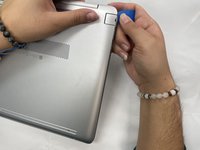
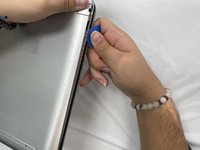
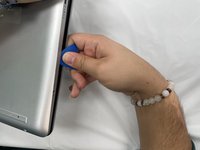
Insert an opening pick into the gap between the lower case and chassis.
-
Slide the pick around the entire perimeter of the device until the lower case fully releases.
-
Remove the lower case.
-
-


Conclusion
To reassemble your device, follow these instructions in reverse order.


