
HP 15-db0015dx Optical Drive Replacement

Daniel McGuire and 8 other contributors
Last updated on Jan 3, 2023
Views: 1.5K
View statistics:
- Past 24 Hours:
- 2
- Past 7 Days:
- 27
- Past 30 Days:
- 81
- All Time:
- 1,457
Comments: 1
1 comment on steps.
Completed: 0 1
No one has marked this guide "completed." Will you be the first?
1 person has marked this guide "completed." It's you — great job!
Favorites: 0 1
No one has favorited (and subscribed to) this guide. Will you be the first?
1 person has favorited (and subscribed to) this guide — and that's you!
Introduction
Go to step 1 ↓Use this guide to replace the optical drive on an HP 15-db0015dx laptop.
The optical drive, better known as a CD or disk drive, allows you to use a CD, DVD, or disk in general. This allows you to listen to music, watch a movie, and write or store data on a disk. A failing Optical drive will typically not open or eject the disk compartment when prompted.
Be sure to troubleshoot before starting repairs. It is possible that the software lost power causing the drive to not open. Restart the computer and see if the drive will work. Also, see if the disk was inserted improperly by manually opening the disk drive, removing the disk, and trying to open it again.
What you need
Tools

-
-
-
Make sure the disc drive is clear of any discs.
-
Remove the rubber stays from the bottom of the device.
-
Using a Phillips #0 screwdriver, remove the eleven screws on the back cover.
 Ask FixBot
-
-
-


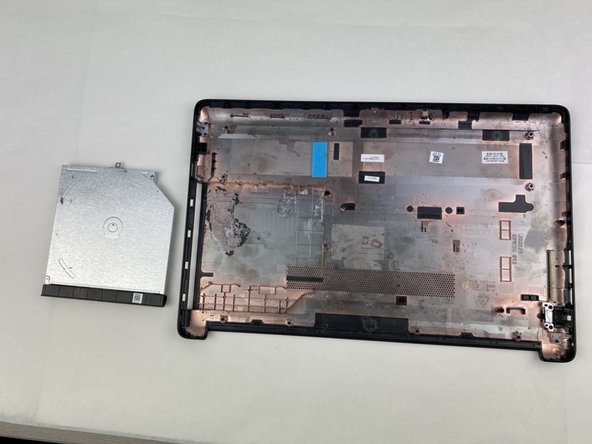
To reassemble your device, follow these instructions in reverse order.

Team

Embry-Riddle Aeronautical University, Team S2-G5, Watkins Spring 2020 Member of Embry-Riddle Aeronautical University, Team S2-G5, Watkins Spring 2020
ERAU-WATKINS-S20S2G5
5 Members
84 Guides authored
