
HP 15-db0015dx Battery Replacement

Steven Dankiewicz and 4 other contributors
Last updated on Jan 10, 2025
Views: 8.8K
View statistics:
- Past 24 Hours:
- 5
- Past 7 Days:
- 31
- Past 30 Days:
- 129
- All Time:
- 8,837
Comments: 7
6 comments on steps, 1 guide comment.
Go to guide commentsCompleted: 8 9
8 people have marked this guide "completed." Will you be next?
9 people have marked this guide "completed." Including you — great job!
Favorites: 0 1
No one has favorited (and subscribed to) this guide. Will you be the first?
1 person has favorited (and subscribed to) this guide — and that's you!
Introduction
Go to step 1 ↓Following this guide will help you remove and replace the battery in your HP 15-db0015dx.
Reasons for battery replacement:
- Computer won’t turn on without being plugged in.
- Battery doesn’t seem to hold a charge.
Replacing the battery will alleviate these issues and lengthen the lifespan of your laptop.
What you need
Fix Kit
This kit contains all the parts and tools needed to complete this guide.

Parts

Tools
-
Spudger4.9


-
-
-
Power off the device before starting.
-
Remove the rubber strips that hide the screws using the spudger.
-
Flip the device and unscrew the eleven screws with a Phillips #0 screwdriver.
 Ask FixBot
-
-
-
Use the spudger tool to pry open the back cover.
-
Lift the back panel to access the inside.
-
Slide the CD drive to the left, and remove.
-
-
-
-
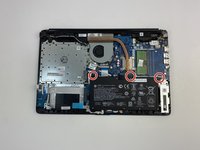
Unscrew the three battery screws with a Phillips #0 screwdriver.
-
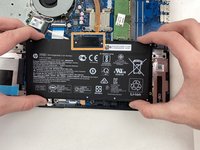
Lift the battery up, disconnecting the connector first.
-
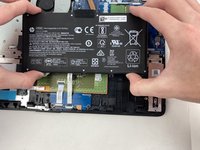
Push forward and remove the battery.
-
-


To reassemble your device, follow these instructions in reverse order.
Cancel: I did not complete this guide.
8 other people completed this guide.

Team

Embry-Riddle Aeronautical University, Team S2-G5, Watkins Spring 2020 Member of Embry-Riddle Aeronautical University, Team S2-G5, Watkins Spring 2020
ERAU-WATKINS-S20S2G5
5 Members
84 Guides authored
1 Guide Comment
Dobrej schanim zakladovou desku na HP Pavilion 15-db005dx Palmrest ,
Mohli bysta mi poradit kde ji koupim predem dekuji za odpoved.
