
HP 15-bs168cl Battery Replacement

Ian Gascon and one other contributor
Last updated on Dec 27, 2019
Views: 811
View statistics:
- Past 24 Hours:
- 3
- Past 7 Days:
- 21
- Past 30 Days:
- 72
- All Time:
- 811
Comments: 0
No one has left comments on this guide. Will you be first?
Go to guide commentsCompleted: 0 1
No one has marked this guide "completed." Will you be the first?
1 person has marked this guide "completed." It's you — great job!
Favorites: 0 1
No one has favorited (and subscribed to) this guide. Will you be the first?
1 person has favorited (and subscribed to) this guide — and that's you!
Introduction
Go to step 1 ↓Here is a step by step way to remove and replace your battery for the HP 15-bs168cl. Please make sure that you have tested the battery following the instructions listed here.
If your battery fails the tests and needs to be replaced, you are able to purchase a new battery and replace it following this guide.
What you need
Tools

-
-
-
-
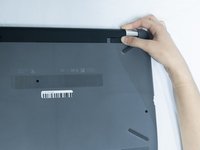
Slide the Battery lock slider to the right until you see the “Unlocked” lock symbol.
-
-
-
Slide the Battery release slider towards the battery while pulling the battery out.
-


 Ask FixBot


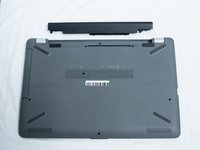
To reassemble your device, follow these instructions in reverse order.

Team

UC Santa Barbara, Team S3-G3, Nowak Fall 2019 Member of UC Santa Barbara, Team S3-G3, Nowak Fall 2019
UCSB-NOWAK-F19S3G3
3 Members
72 Guides authored
