
HP 15-ay114cy Battery Replacement

Michael Falanga and 3 other contributors
Last updated on Apr 27, 2020
Views: 753
View statistics:
- Past 24 Hours:
- 1
- Past 7 Days:
- 13
- Past 30 Days:
- 64
- All Time:
- 753
Comments: 3
3 comments on steps.
Completed: 0 1
No one has marked this guide "completed." Will you be the first?
1 person has marked this guide "completed." It's you — great job!
Favorites: 0 1
No one has favorited (and subscribed to) this guide. Will you be the first?
1 person has favorited (and subscribed to) this guide — and that's you!
Introduction
Go to step 1 ↓If your HP 15-ay114cy (also known as the HP Notebook 15) does not hold a charge, you most likely have a faulty or dead battery that will need to be replaced.
A properly working battery would experience a long battery life, in addition to being able to power on without any issues. However, since the battery is a consumable component of this device, over time it can experience wear after several charging cycles.
Before replacing the device battery, relate back to this troubleshooting page for further information about what is causing your symptoms. Ensure that all external devices are unplugged from your USB or Audio ports. It is also important to unplug the device from any charging cables and to turn off the device before following the replacement guide.
No tools or special skills will be required to remove and replace the device battery.
-
-
-
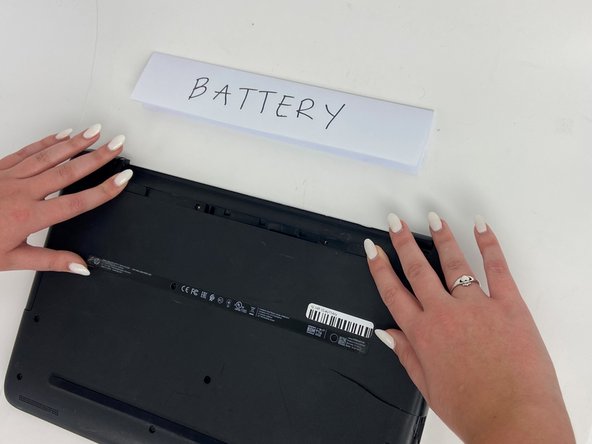
Orient the Laptop so the HP logo is facing the table and the battery tabs are accessible.
 Ask FixBot
-
-
-
Place your index fingers on each of the two battery holder clips.
-
Using your index fingers, push the battery holder clips inwards (towards the center of the laptop).
-
-
-
-
After the battery clips are pushed in, use either hand to grab hold of the battery.
-
Gently push up to remove the battery.
-
-


To reassemble your device, follow these instructions in reverse order.


